


Generate accurate multi-region apparel size charts with schema markup to reduce returns and improve Shopify product page conversions.
Published:
August 18, 2026
Author:
Yi Cui
Enter your garment measurements. Get SEO-ready size charts in US, UK, EU, AU, and JP — with the schema markup that gets you into rich results.
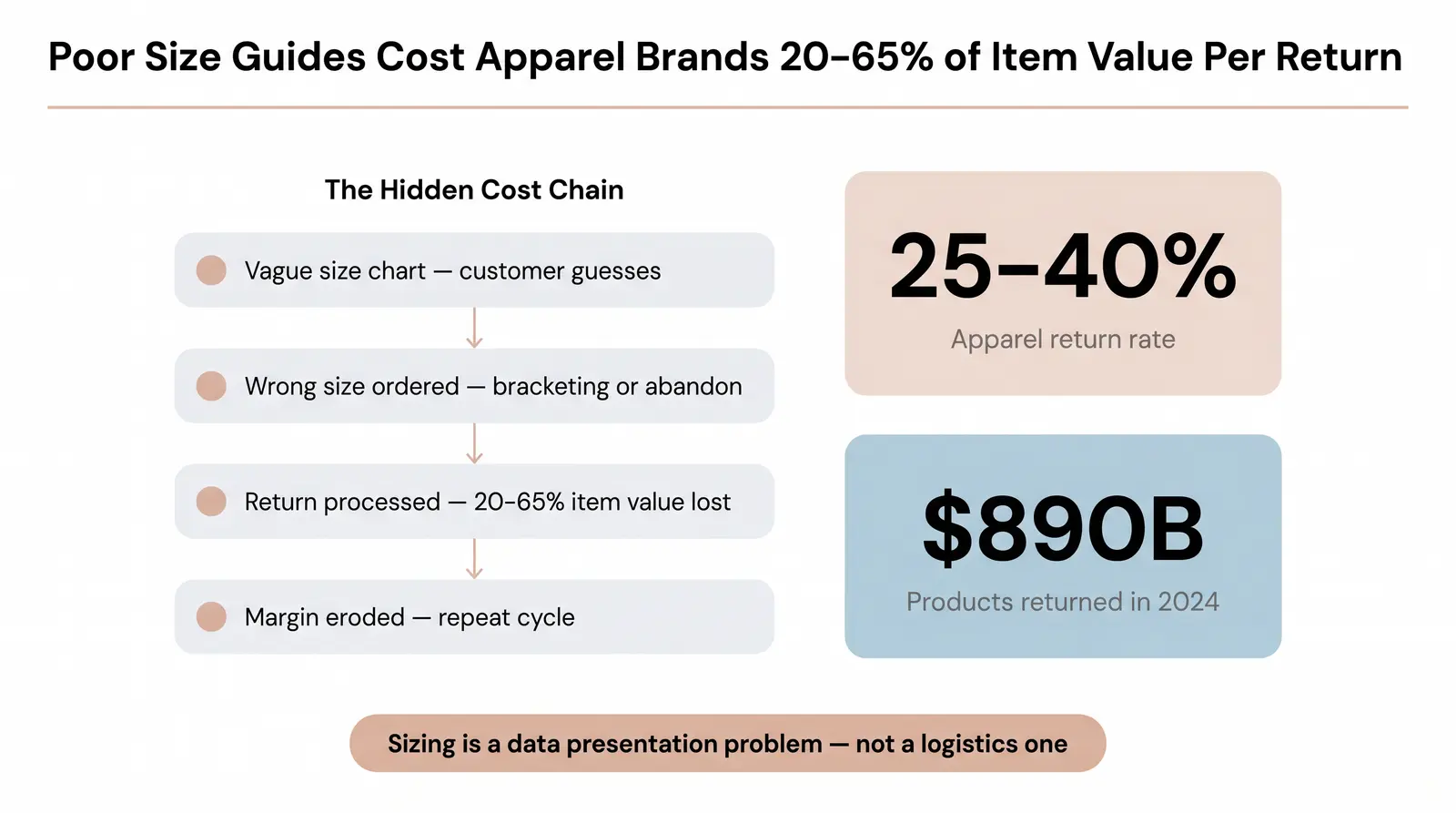
The average ecommerce return rate hit 16.9% across all categories in 2024, but in apparel, that number routinely climbs to 25-40% [1] [2]. The primary driver is simple: incorrect sizing and fit [2]. Shoppers cannot try on garments through a screen. When they are forced to guess their size based on vague or missing information, they either abandon the cart or engage in "bracketing," which means buying multiple sizes with the explicit intent to return the ones that do not fit.
For Shopify store owners and brand builders, solving the sizing problem is not just about reducing reverse logistics costs. It is about eliminating friction to increase conversion rates. You need to generate accurate, professional size charts that work across multiple international regions, including the US, UK, EU, AU, and JP. At the same time, structuring this size data correctly can unlock Google rich results, giving your product pages enhanced visibility in search engine results pages.
This guide covers the tool logic behind generating accurate size charts, the regional conversion standards you need to know, copy-paste implementation code, and exactly how to get your size guide into Google rich results using schema markup.
The business cost of poor size guides extends far beyond the immediate loss of a sale. When a customer returns an item, the retailer absorbs the cost of return shipping, inspection, restocking, and potential markdowns if the item is no longer in season. Collectively, consumers returned products worth $890 billion in 2024, and the cost to process a single return can consume anywhere from 20% to 65% of the item's original value [1]. For apparel brands, where sizing inconsistency is the leading cause of returns, this dynamic severely erodes profit margins.
Most brands treat returns as a logistics problem to be solved with better warehouse software or stricter return policies. Here is the non-obvious insight: sizing is primarily a data presentation problem. The garment often fits the customer perfectly well, but the size chart failed to communicate that fit effectively. A shopper who knows they are a "Medium" in one brand has no reliable way to translate that to another brand without clear, garment-specific measurements [3]. When the data presentation fails, the customer loses confidence and either does not buy or buys and returns.
In our experience at Branvas, founders launching private-label apparel brands almost always underestimate how much a missing or vague size chart suppresses their conversion rate in the first 90 days. Customers want to buy, but they will not risk the hassle of a return if they are unsure about the fit. Providing a clear, localized size chart is the highest-leverage optimization you can make to your product pages.
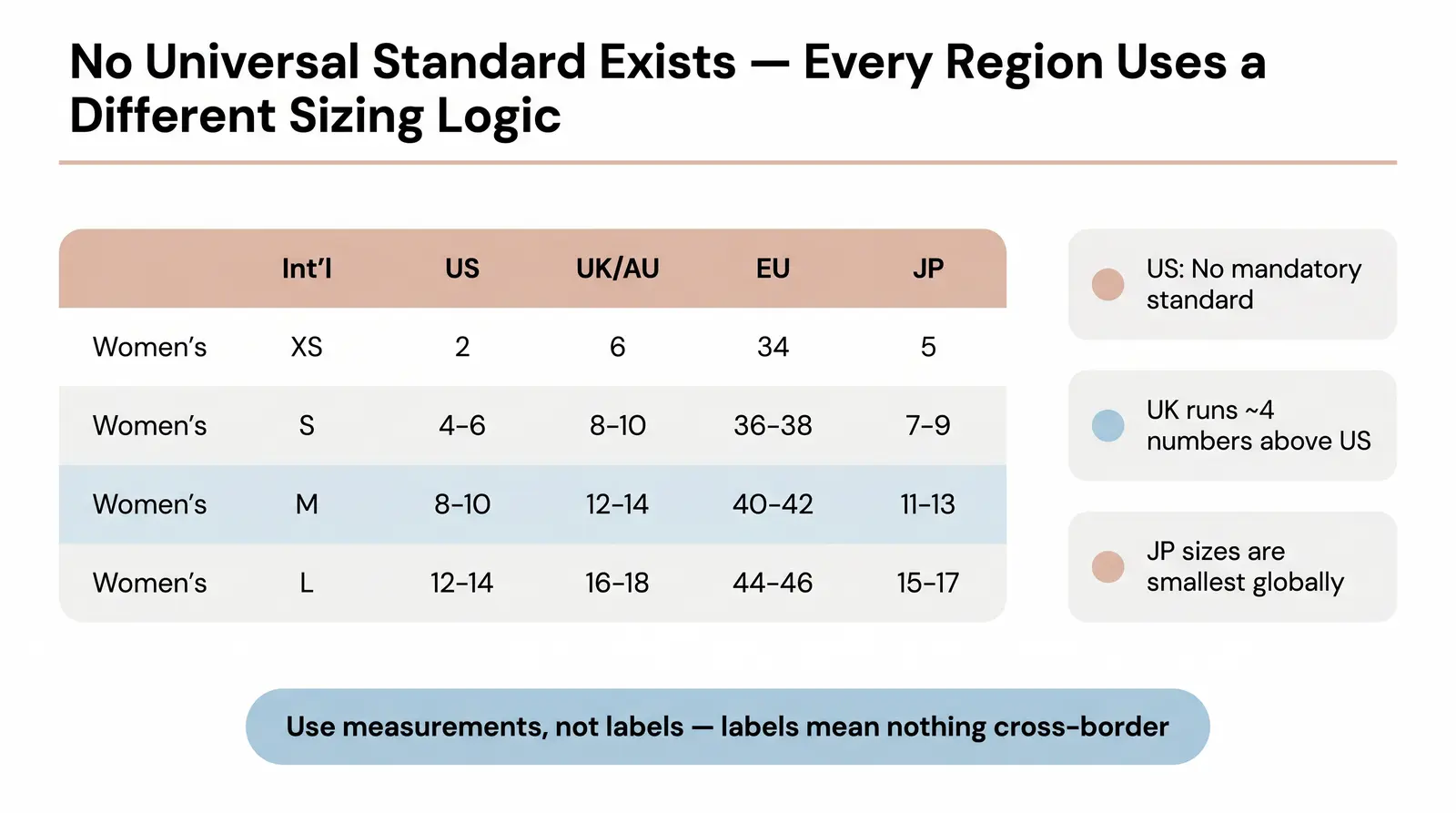
International sizing systems are not interchangeable. The historical divergence of sizing standards means that a "Medium" in the United States represents completely different dimensions than a "Medium" in Japan or Europe. This divergence stems from different regional anthropometric data, varying fit preferences, and the absence of a single, universally adopted global standard.
The United States has no mandatory clothing size or labeling standard. A series of voluntary ASTM standards have existed since the 1990s, but individual brands size their products according to their own preferences [5]. This is why two size 10 dresses from different US brands can have dramatically different dimensions. The UK historically used a system where sizes run roughly 4 numbers higher than their US equivalents. European sizing uses a numeric system based on body measurements in centimeters, typically running from the 30s to the 50s for women. Australian sizing traditionally mirrors UK sizing. Japanese sizing uses a numeric system that roughly corresponds to odd numbers for women (5, 7, 9, 11, 13) and is generally smaller than Western equivalents.
For direct-to-consumer brands selling cross-border, this creates compounding confusion. A UK size 10 is roughly equivalent to a US size 6, while an EU size 38 might align with both, depending on the manufacturer [4] [5]. When a brand simply lists "S, M, L" without regional localization or precise measurements, international customers are left guessing.
To solve this, brands must map their garments to regional equivalents accurately. The table below is a multi-region apparel size conversion master table for reference.
Measurement methodology: Chest is measured at the fullest point with arms relaxed at sides. Waist is measured at the natural crease. Hips are measured at the fullest point. All measurements are body measurements, not garment measurements. Sources: [4] [5]
| Int'l Size | US | UK / AU | EU | JP | Chest (in / cm) | Waist (in / cm) | Hip (in / cm) |
|---|---|---|---|---|---|---|---|
| Women's Tops and Dresses | |||||||
| XS | 2 | 6 | 34 | 5 | 32-33 / 81-84 | 24-26 / 61-66 | 34-36 / 86-92 |
| S | 4-6 | 8-10 | 36-38 | 7-9 | 34-35 / 86-89 | 27-28 / 69-71 | 37-38 / 94-97 |
| M | 8-10 | 12-14 | 40-42 | 11-13 | 36-37 / 91-94 | 29-30 / 74-76 | 39-40 / 99-102 |
| L | 12-14 | 16-18 | 44-46 | 15-17 | 38-40 / 97-102 | 31-33 / 79-84 | 41-43 / 104-109 |
| XL | 16-18 | 20-22 | 48-50 | 19-21 | 41-43 / 104-109 | 34-36 / 86-92 | 44-46 / 112-117 |
| XXL | 20 | 24 | 52 | 23 | 44-46 / 112-117 | 37-39 / 94-99 | 47-49 / 119-125 |
| Men's Shirts | Chest (in / cm) | Neck (in / cm) | |||||
| S | 34-36 | 34-36 | 44-46 | 36 | 34-36 / 86-91 | 14-14.5 / 36-37 | - |
| M | 38-40 | 38-40 | 48-50 | 38-40 | 38-40 / 97-102 | 15-15.5 / 38-39 | - |
| L | 42-44 | 42-44 | 52-54 | 42-44 | 42-44 / 107-112 | 16-16.5 / 40-42 | - |
| XL | 46-48 | 46-48 | 56-58 | 46 | 46-48 / 117-122 | 17-17.5 / 43-44 | - |
| XXL | 50-52 | 50-52 | 60-62 | 48 | 50-52 / 127-132 | 18-18.5 / 45-47 | - |
A size chart generator automates the process of translating a single set of measurements into localized formats and structured data. For non-technical sellers, the workflow is designed to be straightforward.
The core logic follows a simple input-to-output flow. First, you enter the raw garment measurements (chest, waist, hip, inseam, shoulder width) in either inches or centimeters. The tool then maps these measurements to regional sizing standards using validated conversion logic, calculating the appropriate size designations for each market. Finally, it generates a formatted size chart in multiple regional formats, a block of JSON-LD schema markup for SEO, a copy-paste HTML table for your product page, and optionally a CSV download.
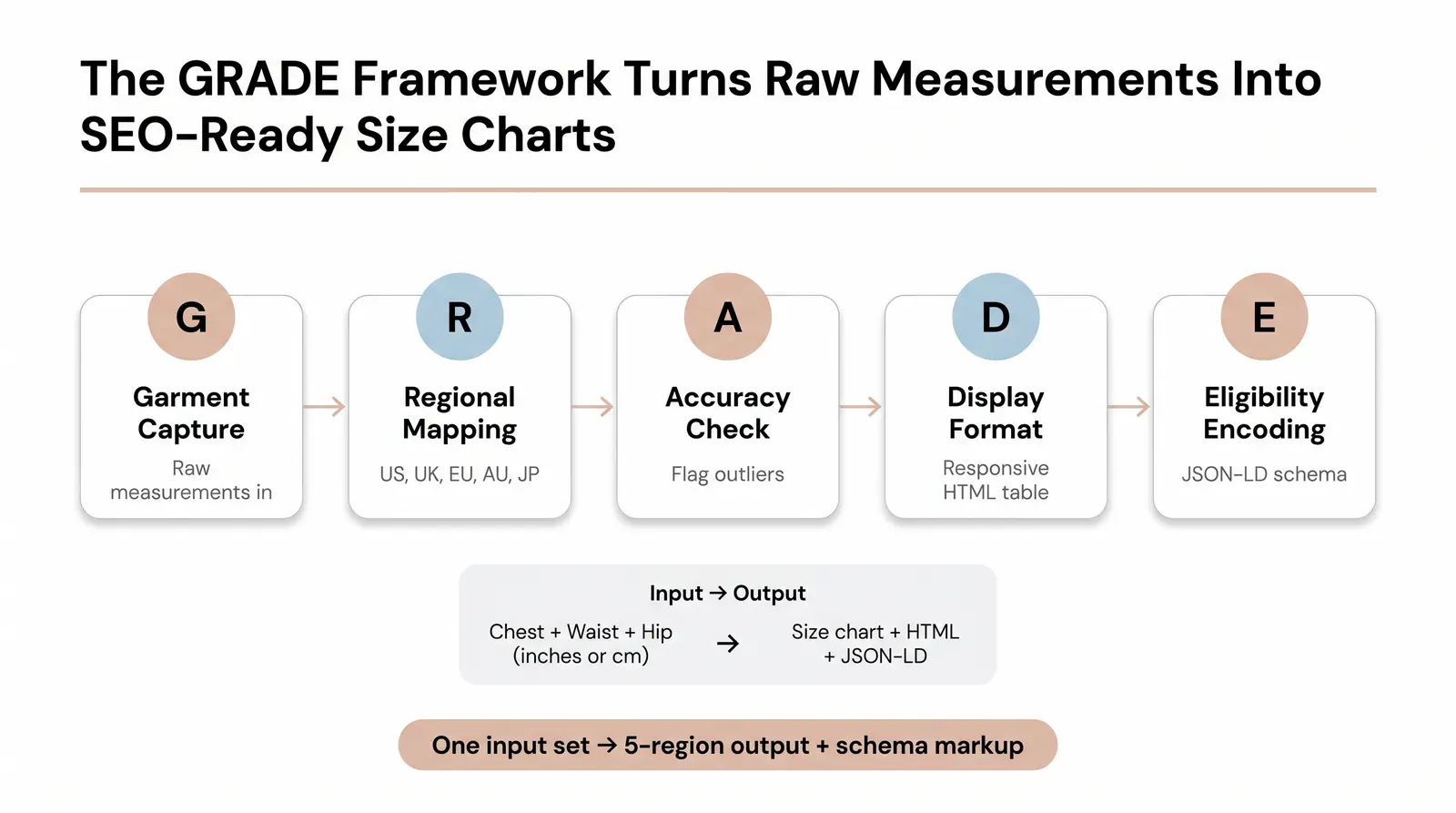
To standardize this process, we developed the GRADE Framework. It is a five-step model that covers the full journey from raw measurement to search-engine-visible output.
| Step | Name | What Happens |
|---|---|---|
| G | Garment Measurement Capture | Collect raw, accurate inputs directly from the garment, not generic body estimates. |
| R | Regional Mapping | Apply conversion logic to map measurements to US, UK, EU, AU, and JP standards. |
| A | Accuracy Validation | Flag outliers or non-standard measurements that indicate a unique fit (e.g., oversized, cropped). |
| D | Display Formatting | Generate clean, responsive HTML table output optimized for mobile and desktop. |
| E | Eligibility Encoding | Wrap the data in JSON-LD schema markup so search engines can read and index the size guide. |
We built the GRADE Framework after watching too many Branvas brand partners publish size charts that were either inaccurate across regions or technically invisible to search engines. Both problems are fixable, and both start with a structured process.
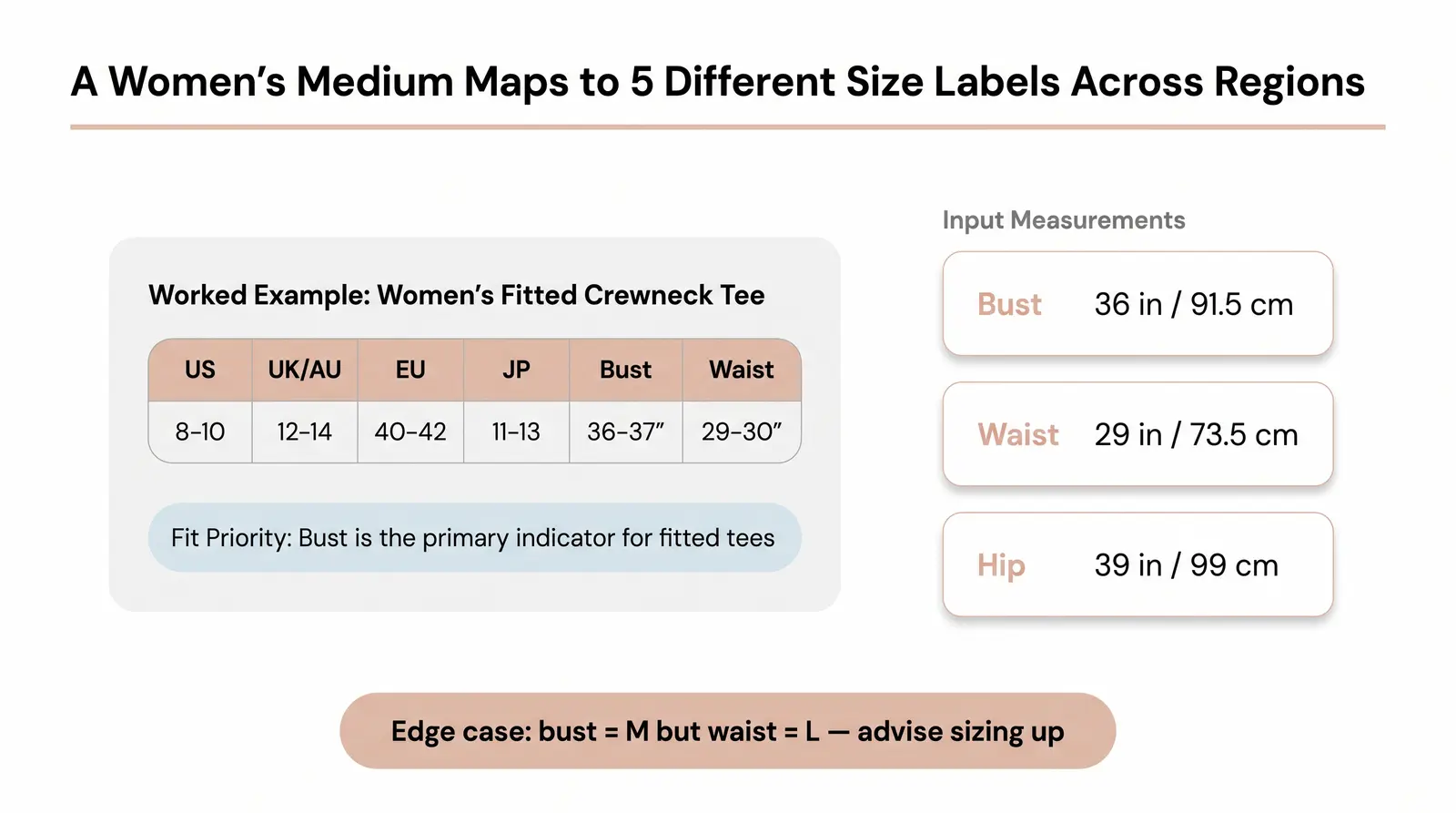
Here is the GRADE Framework applied end-to-end for a specific garment: a women's fitted crewneck tee.
| Size Label | US | UK / AU | EU | JP | Bust | Waist | Hip |
|---|---|---|---|---|---|---|---|
| Women's Medium | 8-10 | 12-14 | 40-42 | 11-13 | 36-37" (91-94 cm) | 29-30" (74-76 cm) | 39-40" (99-102 cm) |
Fit Priority Note: For a fitted tee, the bust measurement is the primary fit indicator. If a customer's bust maps to a Medium but their waist maps to a Large, advise them to size up for a more relaxed fit around the midsection. This is a common edge case. Communicate your brand's fit priority clearly on the product page so customers can make an informed decision rather than guessing.
The following block uses current SizeSpecification schema from schema.org [8]. This markup is placed inside a <script> tag in your product page's <head> or <body>.
<script type="application/ld+json">
{
  "@context": "https://schema.org/",
  "@type": "Product",
  "name": "Women's Fitted Crewneck Tee",
  "description": "A classic fitted crewneck t-shirt for women.",
  "brand": {
    "@type": "Brand",
    "name": "Your Brand Name"
  },
  "offers": {
    "@type": "Offer",
    "priceCurrency": "USD",
    "price": "39.00",
    "availability": "https://schema.org/InStock"
  },
  "size": {
    "@type": "SizeSpecification",
    "sizeSystem": "https://schema.org/WearableSizeSystemUS",
    "sizeGroup": "https://schema.org/WearableSizeGroupWomens",
    "name": "M",
    "suggestedGender": "female",
    "hasMeasurement": [
      {
        "@type": "QuantitativeValue",
        "valueReference": "https://schema.org/WearableMeasurementChestOrBust",
        "unitCode": "INH",
        "value": 36
      },
      {
        "@type": "QuantitativeValue",
        "valueReference": "https://schema.org/WearableMeasurementWaist",
        "unitCode": "INH",
        "value": 29
      }
    ],
    "suggestedMeasurement": [
      {
        "@type": "QuantitativeValue",
        "valueReference": "https://schema.org/BodyMeasurementChest",
        "unitCode": "INH",
        "minValue": 36,
        "maxValue": 37
      },
      {
        "@type": "QuantitativeValue",
        "valueReference": "https://schema.org/BodyMeasurementWaist",
        "unitCode": "INH",
        "minValue": 29,
        "maxValue": 30
      }
    ]
  }
}
</script>
The following table is copy-paste ready and includes basic inline CSS for mobile responsiveness. The overflow-x: auto wrapper ensures the table scrolls horizontally on small screens rather than breaking the layout.
<div style="overflow-x: auto; max-width: 100%; -webkit-overflow-scrolling: touch;">
  <table role="table" style="width: 100%; border-collapse: collapse; text-align: left; font-family: sans-serif; font-size: 14px;">
    <caption style="text-align: left; font-weight: bold; padding: 8px 0; font-size: 16px;">
      Women's Fitted Crewneck Tee — Size Guide
    </caption>
    <thead>
      <tr style="background-color: #f8f9fa; border-bottom: 2px solid #dee2e6;">
        <th scope="col" style="padding: 12px 16px;">US</th>
        <th scope="col" style="padding: 12px 16px;">UK / AU</th>
        <th scope="col" style="padding: 12px 16px;">EU</th>
        <th scope="col" style="padding: 12px 16px;">JP</th>
        <th scope="col" style="padding: 12px 16px;">Bust (in / cm)</th>
        <th scope="col" style="padding: 12px 16px;">Waist (in / cm)</th>
      </tr>
    </thead>
    <tbody>
      <tr style="border-bottom: 1px solid #dee2e6;">
        <td style="padding: 12px 16px;">2</td>
        <td style="padding: 12px 16px;">6</td>
        <td style="padding: 12px 16px;">34</td>
        <td style="padding: 12px 16px;">5</td>
        <td style="padding: 12px 16px;">32-33 / 81-84</td>
        <td style="padding: 12px 16px;">24-26 / 61-66</td>
      </tr>
      <tr style="border-bottom: 1px solid #dee2e6; background-color: #fafafa;">
        <td style="padding: 12px 16px;">4-6</td>
        <td style="padding: 12px 16px;">8-10</td>
        <td style="padding: 12px 16px;">36-38</td>
        <td style="padding: 12px 16px;">7-9</td>
        <td style="padding: 12px 16px;">34-35 / 86-89</td>
        <td style="padding: 12px 16px;">27-28 / 69-71</td>
      </tr>
      <tr style="border-bottom: 1px solid #dee2e6;">
        <td style="padding: 12px 16px;">8-10 (M)</td>
        <td style="padding: 12px 16px;">12-14</td>
        <td style="padding: 12px 16px;">40-42</td>
        <td style="padding: 12px 16px;">11-13</td>
        <td style="padding: 12px 16px;">36-37 / 91-94</td>
        <td style="padding: 12px 16px;">29-30 / 74-76</td>
      </tr>
    </tbody>
  </table>
</div>
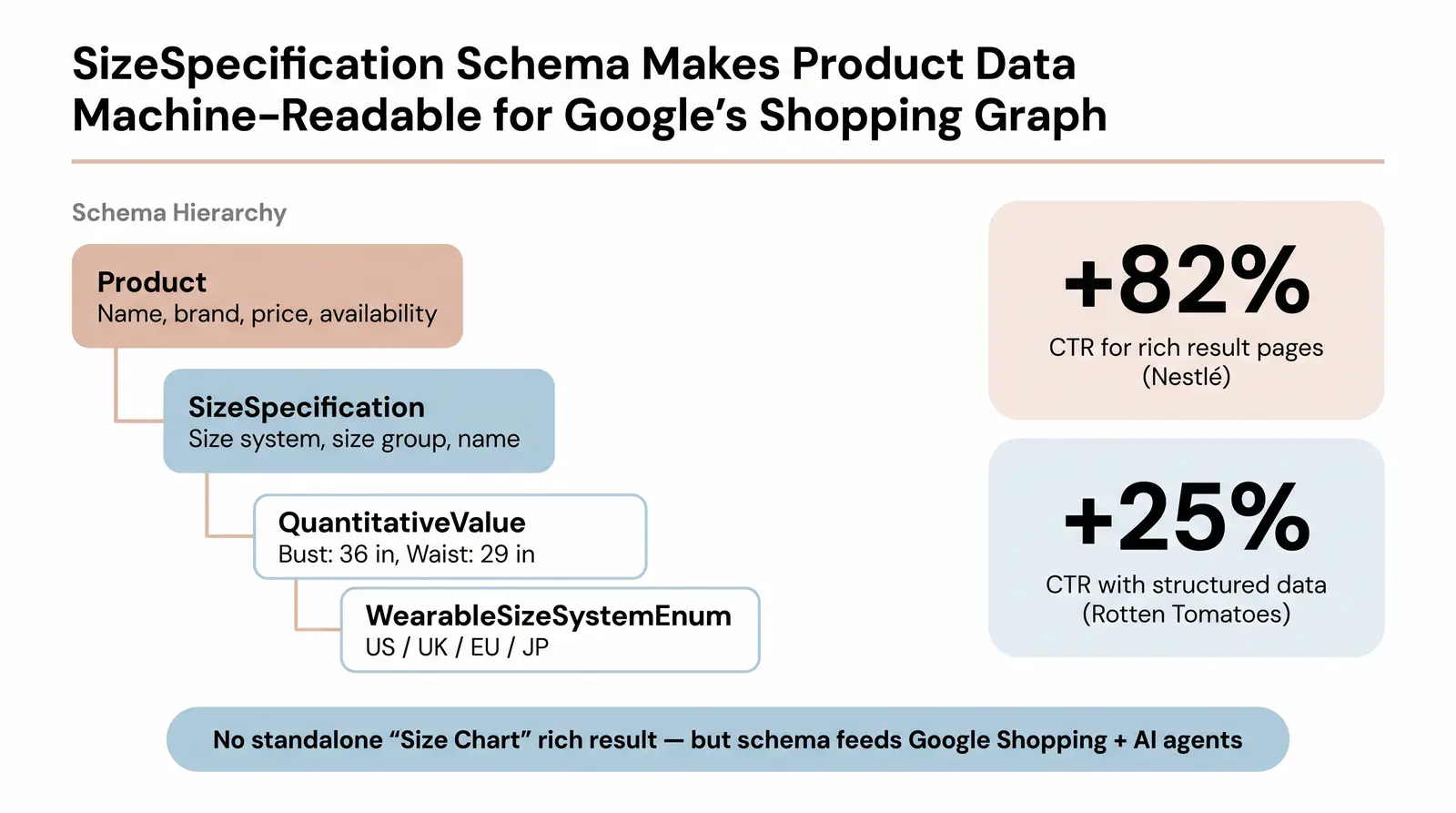
Structured data is a standardized format for providing information about a page and classifying its content [6]. When you add it to your product pages, Google can use that information to display a "rich result," which is an enhanced search listing that may include price, availability, review ratings, and detailed product specifications directly in the SERP. The impact on click-through rates is well documented. Rotten Tomatoes measured a 25% higher CTR for pages enhanced with structured data, and Nestlé measured pages showing as rich results with an 82% higher CTR than non-rich result pages [6].
For apparel, the relevant schema.org types are:
Product: The parent type that describes the garment itself, including name, brand, price, and availability [7].SizeSpecification: Used within the size property of a Product to detail standardized sizes, measurement systems, and specific dimensions [8].QuantitativeValue: Used to express the actual numerical measurements (e.g., 36 inches for bust).WearableSizeSystemEnumeration: Specifies which regional sizing system applies (e.g., WearableSizeSystemUS, WearableSizeSystemUK, WearableSizeSystemEurope).Important note on rich result eligibility: As of 2025-2026, Google's documented rich result types for ecommerce focus primarily on Product schema for merchant listings, including price, availability, and shipping. The SizeSpecification schema is a valid and supported property within Product markup, and Google explicitly mentions apparel sizing as a supported enhancement for merchant listings [7]. However, there is no standalone "Size Chart" rich result type that renders a full chart in the SERP. The value of encoding size data is that it makes your product data machine-readable for Google's shopping graph, voice search, and AI shopping agents, even if it does not produce a visually distinct rich snippet on its own.
To implement on Shopify, embed the JSON-LD block directly into your product.liquid or main-product.liquid template. Use Liquid variables to dynamically populate product name and price. After deploying, test your markup using Google's Rich Results Test to confirm validity.
Most Shopify sellers only add basic Product schema (price and reviews) and miss the size specification layer entirely. This means their size guide is invisible to Google's indexing layer even when it is published on the page. By encoding your sizing data, you not only improve SEO but also make your product data accessible to voice search assistants, accessibility parsers, and emerging AI shopping agents that rely on structured data to make recommendations.
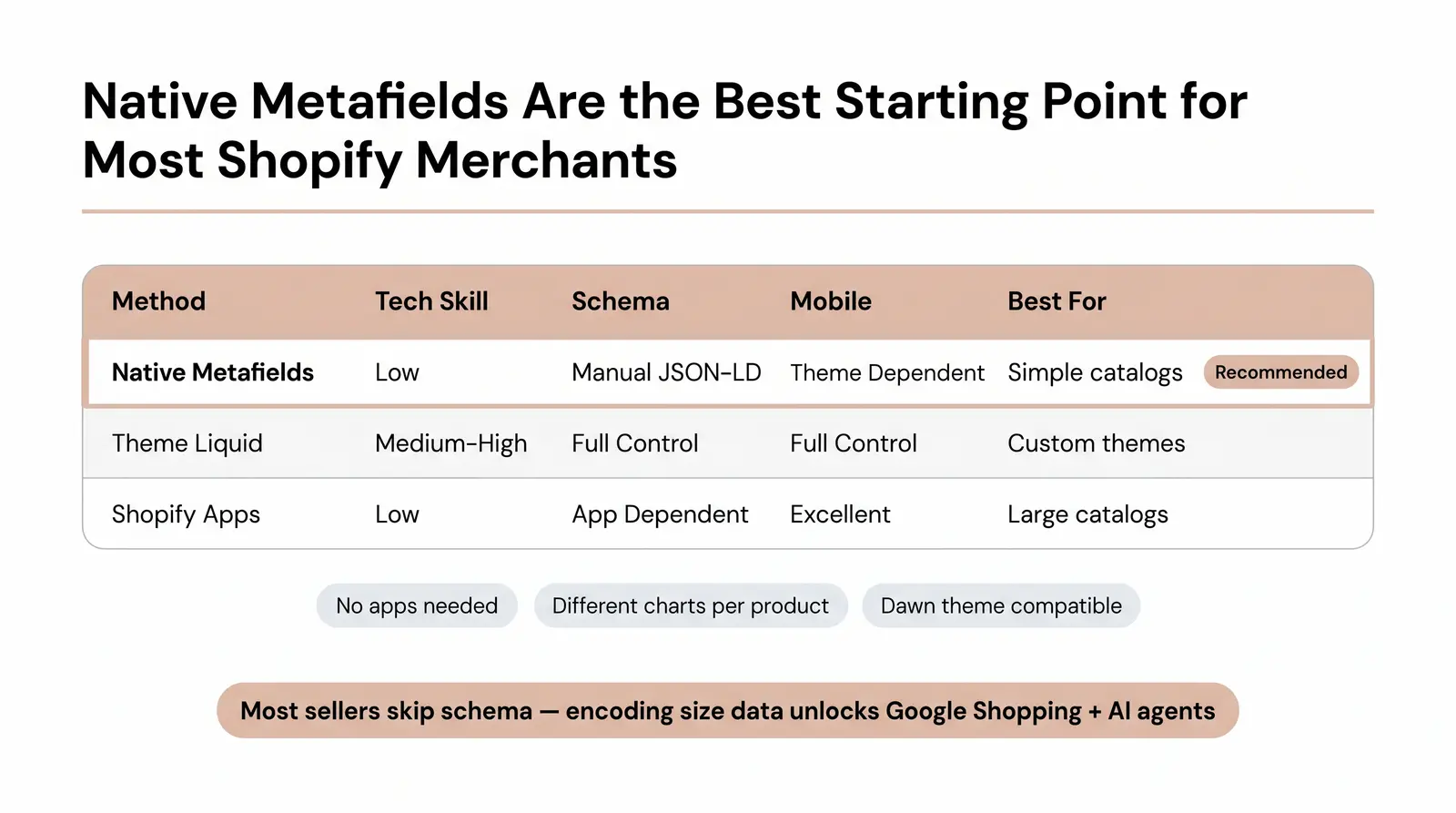
Adding a size chart to your Shopify store can be accomplished through three distinct paths, each with its own trade-offs.
Path 1: Native Shopify (Metafields and Theme Editor). Create a dedicated "Size Chart" page in your Shopify admin under Online Store, then define a product metafield that references a page. In the Dawn theme or any Online Store 2.0-compatible theme, you can add a "Pop-up" block to your product template and connect it dynamically to the metafield [9]. This approach requires no apps, no coding, and allows you to assign different size charts to different products. It is the recommended starting point for most merchants.
Path 2: Theme Liquid. For more granular control, you can embed the HTML table directly into your product page templates or create custom Liquid sections that conditionally display charts based on product type or tags. This is the most flexible approach but requires comfort with Shopify's Liquid templating language or access to a developer.
Path 3: Shopify Apps. Apps like Kiwi Size Chart and Recommender, ESC Size Charts, and Smart Size Chart offer drag-and-drop builders, AI-powered fit recommendations, and automatic unit conversions [10]. These are the best option for large catalogs with complex sizing rules.
| Method | Tech Skill Required | Schema Support | Mobile Optimization | Cost | Best For |
|---|---|---|---|---|---|
| Native Metafields | Low | Manual (JSON-LD in template) | Theme Dependent | Free | Simple catalogs, budget-conscious sellers |
| Theme Liquid | Medium to High | Full Control | Full Control | Free (Developer Time) | Custom themes, specific layout needs |
| Shopify Apps | Low | App Dependent | Excellent | Monthly Fee | Large catalogs, AI recommendations |
If you're launching a private-label apparel or jewelry brand and want size charts, product pages, and fulfillment handled as a single integrated workflow, explore how Branvas works.
A technically accurate size chart still fails if it is confusing to the customer. These are the practices that separate high-converting size guides from ones that still generate returns.
1. Always include a "How to Measure" guide. A size chart without measurement instructions forces customers to guess whether they are measuring correctly. Add a simple text block or diagram showing exactly where to measure the chest, waist, and hips.
2. Distinguish garment measurements from body measurements. Garment measurements are the dimensions of the flat clothing item. Body measurements are the dimensions of the person wearing it. The difference between the two is called "ease." Mixing them on the same chart without clear labels is one of the most common causes of sizing confusion and subsequent returns.
3. Note fabric behavior. A size chart for a 100% cotton tee and a size chart for a stretch jersey dress should communicate differently. Add a brief note such as "Fabric has 4% elastane; size down for a tighter fit" or "Pre-washed cotton; minimal shrinkage expected."
4. Localize the display. Use Shopify's Geolocation app or theme logic to default to inches for US buyers and centimeters for EU buyers. Forcing a European customer to mentally convert inches adds unnecessary friction.
5. Audit quarterly. Manufacturer specs drift, especially for private-label products. A size chart that was accurate at launch may no longer reflect current inventory. Build a quarterly review into your operations calendar.
SizeSpecification schema markup is implemented on the page.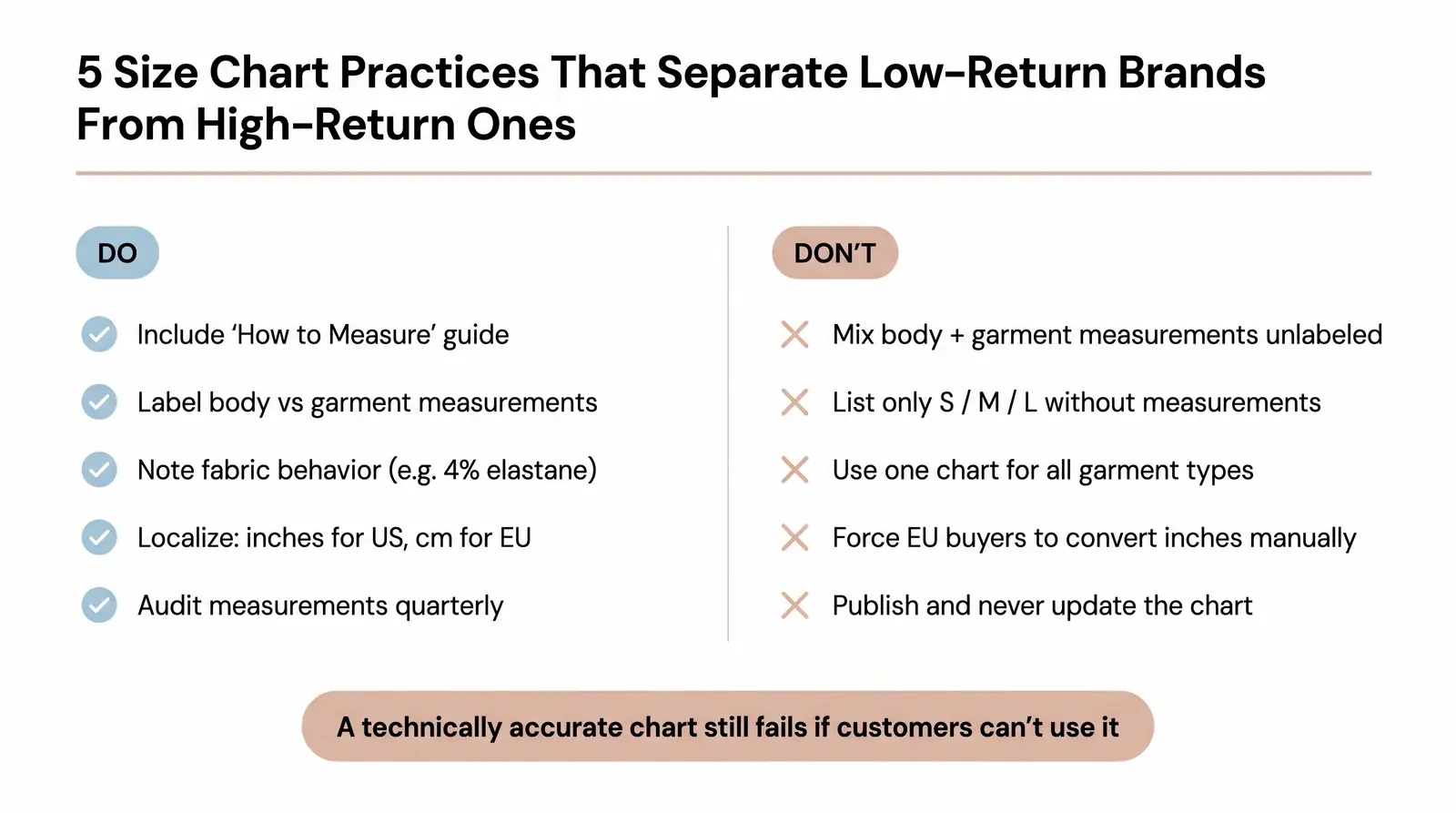
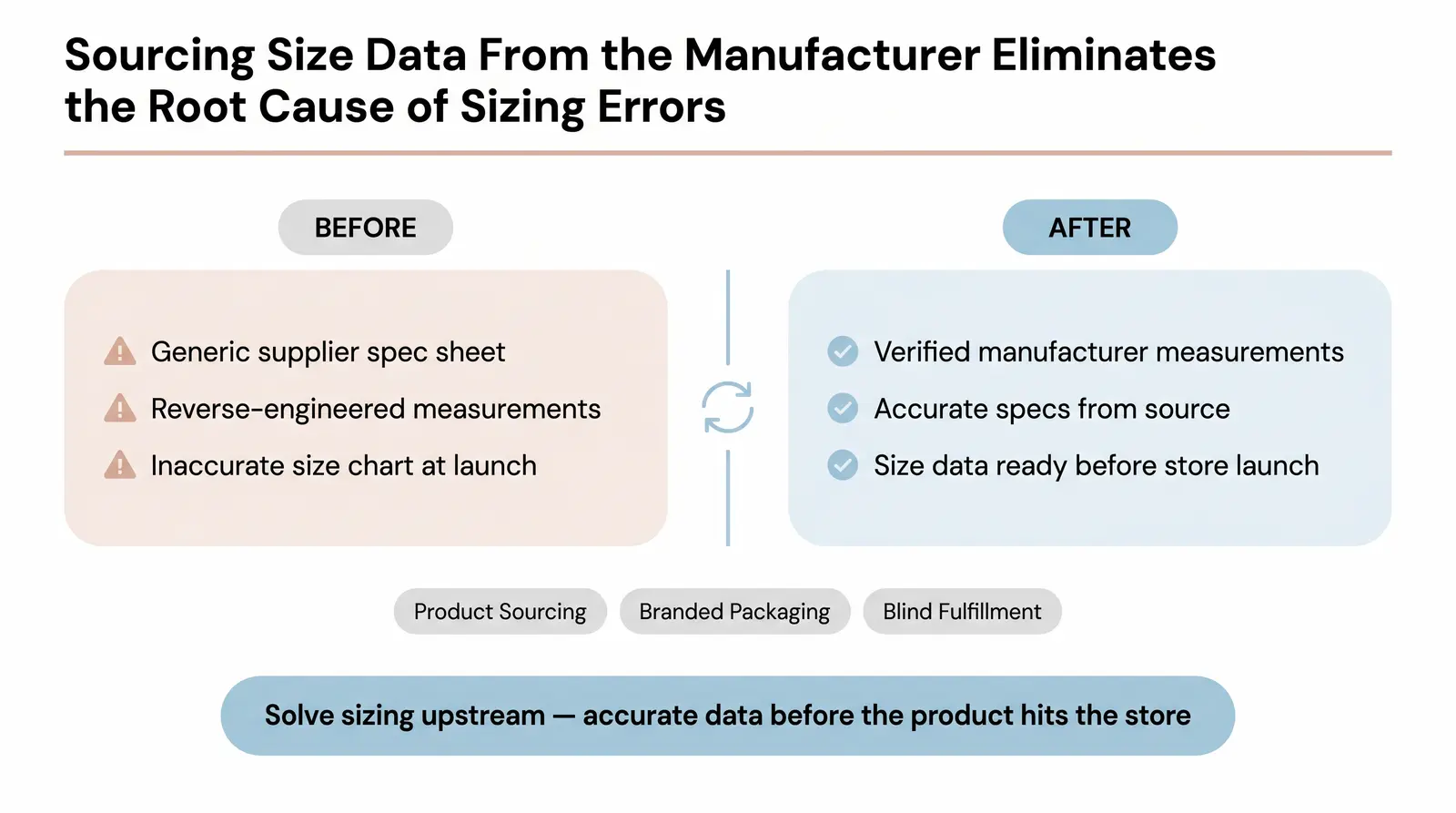
We often see founders struggle with size chart accuracy because they're working from a supplier's generic spec sheet rather than actual garment measurements. That's a structural problem we solve upstream.
Branvas provides product sourcing with accurate manufacturer measurement specs, supports branded packaging, and handles blind fulfillment. Because the size data comes directly from the source and is verified against actual garments, brand partners get accurate measurements without having to reverse-engineer them from a generic chart. This eliminates the sizing data problem before the product even hits the store.
For founders who want to go deeper on ecommerce operations and brand building, the Branvas Academy offers comprehensive resources. Branvas also provides dedicated solutions for ecommerce sellers looking to build or scale a private-label brand.
Ready to launch your private-label brand with accurate sizing built in from day one? See Branvas pricing and plans or browse the product catalog.
An apparel size chart generator is a tool that takes raw garment or body measurements and automatically converts them into formatted size charts across multiple regional standards. You input the key dimensions (chest, waist, hip, inseam) and the tool maps them to US, UK, EU, AU, and JP sizing equivalents. More advanced generators also produce the JSON-LD schema markup and responsive HTML needed to display the chart on ecommerce platforms like Shopify.
Conversion depends on the garment type and gender. As a general rule, a US women's size 6 is equivalent to a UK size 10, an EU size 38, and a Japanese size 9. For men's shirts, US and UK sizing are typically the same, while EU sizing runs approximately 10 numbers higher (a US Medium at 38-40 inches chest is roughly an EU 48-50). Because sizing is not universally standardized across brands, it is always more reliable to use specific chest, waist, and hip measurements rather than simple label conversions.
Yes, in a meaningful way. Implementing Product schema with SizeSpecification properties makes your product data machine-readable for Google's shopping graph. While there is no standalone "Size Chart" rich result type, Google explicitly supports apparel sizing as an enhancement for merchant listings [7]. Pages with complete structured data are also more likely to appear in Google's Shopping tab and are better positioned for voice search and AI shopping agents that rely on structured data to surface product recommendations.
The most robust, code-free method is to create a "Size Chart" page in Shopify, then use product metafields to link that page to specific products. In the Dawn theme, you can add a "Pop-up" block to your product template and connect it dynamically to the metafield [9]. This keeps your product pages clean, allows different charts for different product types, and requires no apps or coding.
Body measurements refer to the actual dimensions of the person wearing the clothes (for example, a 36-inch bust circumference). Garment measurements refer to the dimensions of the clothing item itself when laid flat (for example, a 18-inch half-chest measurement, which doubles to 36 inches). The difference between the two is called "ease," and it determines how tight or loose the garment fits. A well-structured size guide should clearly label which type of measurement it is showing, or ideally show both.