


 Connects over the WooCommerce REST API · no plugin to install
Branvas is a private-label jewelry supplier that connects to your WordPress store through WooCommerce's built-in REST API. Publish 900+ styles as native WooCommerce products, keep your theme and checkout, and let us ship every order in your branded packaging. Nothing to install, nothing to update.

How do you dropship jewelry on WooCommerce with Branvas? Create a read/write REST API key in WooCommerce → Settings → Advanced → REST API, paste the key into your Branvas dashboard, and pick products from 900+ rings, necklaces, earrings and bracelets. Branvas creates them as standard WooCommerce products with your prices. When an order is paid, Branvas receives it, ships it in packaging printed with your logo, and adds the tracking number to the order. No plugin is installed on your site. Connecting is free; automatic sync is on the Growth plan ($29/month).
The exact click path in WordPress. You need an Administrator or Shop Manager account and WooCommerce 3.5 or newer, which every current store has.
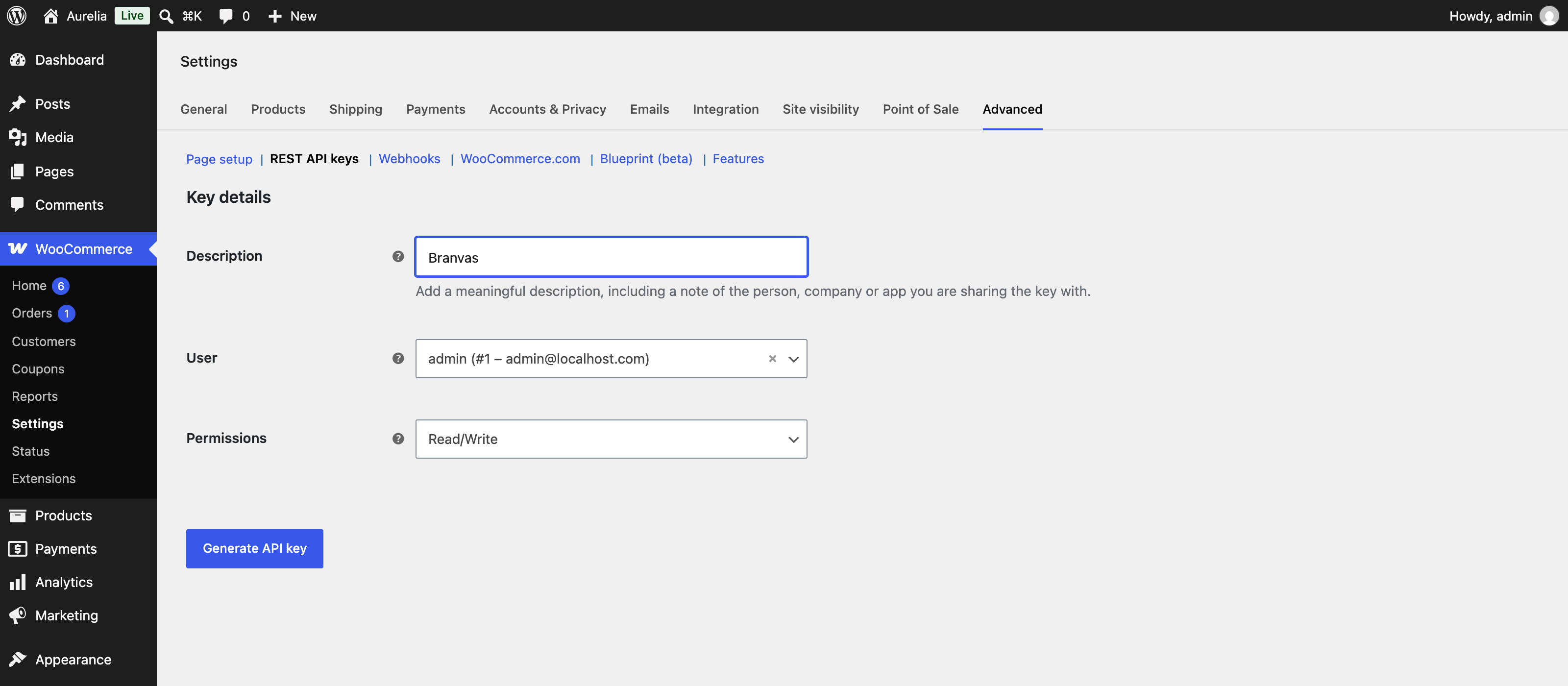
In your WordPress admin go to WooCommerce → Settings → Advanced → REST API → Add key. Give it a description such as “Branvas”, choose your admin user, set Permissions to Read/Write, and click Generate API key. Copy the Consumer key and Consumer secret now; WooCommerce shows the secret only once.
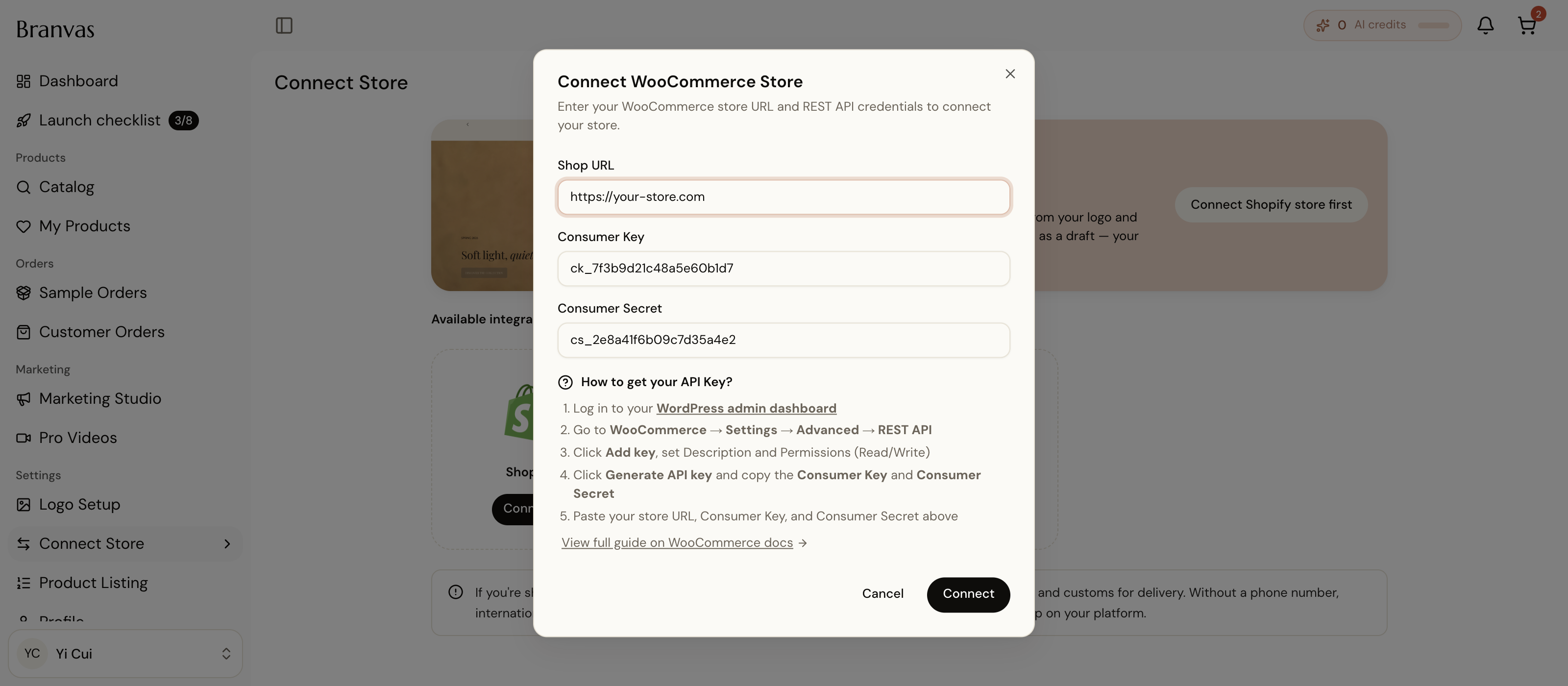
In the Branvas dashboard open Integrations → WooCommerce, enter your store URL and the two keys, and click Connect. Branvas checks the connection and registers order webhooks on your store so paid orders reach us within seconds. Your store must use HTTPS; WooCommerce rejects API keys over plain HTTP.
Choose pieces by collection or material and set your retail price above the wholesale cost shown for each item. Branvas creates them as standard WooCommerce products with variations, images, descriptions and weights, assigned to a “Jewelry” category you can rename. They render in your theme like any other product and work with your existing payment gateways, coupons and tax settings.
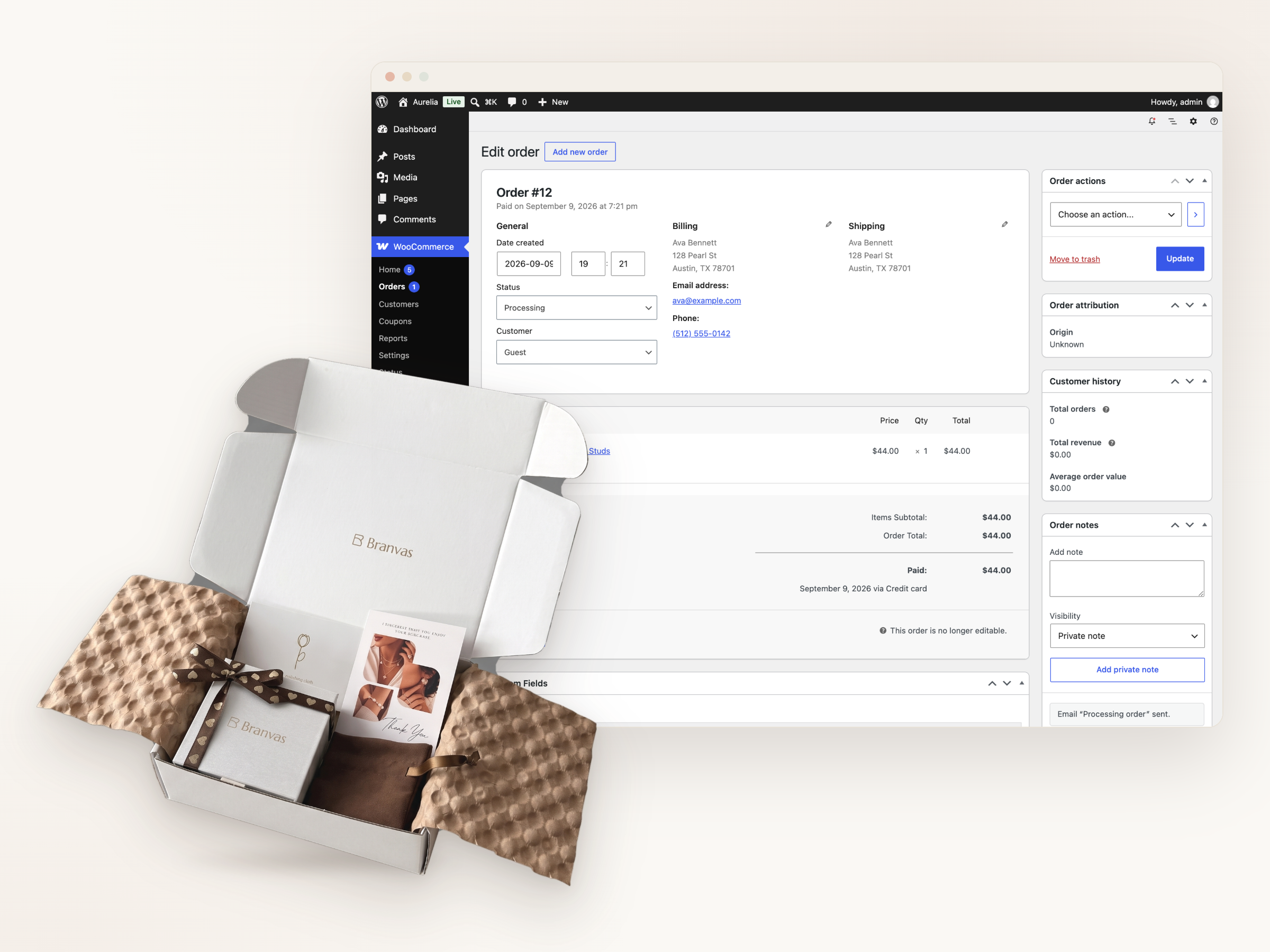
When an order reaches Processing (payment captured), Branvas picks, packs and ships the jewelry line items in your branded box and writes the carrier and tracking number back to the order. You fulfil any non-Branvas items in the same order yourself.
A REST-API connection has different limits from a plugin. Here they are, stated plainly.
| Data | Direction | Sync | Notes |
|---|---|---|---|
| Products (title, description, images, variations, weight) | Branvas → WooCommerce | Automatic | Created as native WooCommerce products. Edit titles, descriptions, categories and prices in WordPress; your edits are kept. |
| Retail price | You set it | Kept | Wholesale cost is fixed per item; you choose the markup. Multi-currency depends on your currency plugin, not on Branvas. |
| Stock status | Branvas → WooCommerce | Automatic | Out-of-stock items are set to “Out of stock” in WooCommerce so they can't be ordered; back in stock when restocked. |
| Orders | WooCommerce → Branvas | On “Processing” | Only paid orders route. Cash-on-delivery and pending-payment orders are ignored until paid. Mixed carts split: we ship our line items, you ship yours. |
| Tracking and fulfilment status | Branvas → WooCommerce | Automatic | Carrier and tracking number written to the order; the order is marked Completed once all Branvas items ship. Customer emails follow your WooCommerce settings. |
| Branded packaging | Set once in Branvas | Every order | Logo on box and packing slip on paid plans. Branded insert card on VIP. |
| Returns and exchanges | You handle with customer | Manual | You approve the return in WooCommerce; Branvas issues return instructions and credit per the return policy. |
| Multisite / multiple stores | — | One key per store | Connect each WooCommerce store with its own API key under the same Branvas account. |
| Plugin on your site | — | None | Nothing to install or update. Deleting the API key disconnects Branvas instantly; your products stay as ordinary WooCommerce products. |
Searching for WooCommerce dropshipping turns up two different things: plugins that automate a supplier you already have (AliDropship, DSers, the official Dropshipping for WooCommerce extension) and marketplaces that give you a catalog (Spocket, Syncee, Printful). Branvas is the second kind, for one category, with your branding on every order.
✓ Run a WordPress store in fashion, beauty, gifts or accessories and want a jewelry line under your own brand, not a supplier's.
✓ Already sell jewelry on WooCommerce and want a US-based supplier that ships in your packaging with no minimum order.
✓ Want to keep full control of your WordPress stack: your theme, your host, your payment gateways, no extra plugin to maintain.
✓ Prefer a single accountable company for product quality, packaging and delivery.
– Need a tool to automate orders to AliExpress or another supplier you already use — that is AliDropship or DSers, not Branvas.
– Want general merchandise across many categories — Spocket or Syncee have broader catalogs.
– Sell fine jewelry (solid gold, natural diamonds, graded stones). Our catalog is fashion and demi-fine.
– Need guaranteed 2-day domestic delivery. Orders typically arrive in 7–10 days.
What each option actually is, for a merchant who wants to sell branded jewelry on WordPress. Details from public listings, Sep 2026; confirm before relying on them.
| Option | What it is | Supplies products? | Private-label packaging | Installs a plugin | Cost |
|---|---|---|---|---|---|
| Branvas | Jewelry supplier + REST-API integration | Yes — 900+ jewelry styles | Yes, logo on box + slip | No | Free to connect; auto-sync from $29/mo |
| Dropshipping for WooCommerce (official extension) | Supplier-notification tool | No — you bring suppliers | No | Yes | $79/yr |
| AliDropship | AliExpress import + order automation | Via AliExpress sellers | No | Yes | $89 one-time |
| Spocket | General-merchandise marketplace | Yes, many categories | Branded invoicing on higher plans | Yes | From $39.99/mo |
| Syncee | Supplier marketplace | Yes, many categories | No | Yes | Free browse; paid to import |
| Printful | Print-on-demand | Yes, POD merch + engraved jewelry | Inside labels / pack-ins | Yes | Free; per-item cost |
Every plugin on a WooCommerce site is code that runs on every page load, needs updates, and can conflict with your theme or another plugin. Branvas deliberately ships none. The integration lives on our servers and talks to your store through the same REST API WooCommerce itself uses for its mobile app and block checkout.
What that means in practice: no PHP on your host, no effect on page speed or Core Web Vitals, no compatibility matrix to check when WordPress or WooCommerce update, and no orphaned tables if you leave. Revoke the API key and the connection is gone; the products you published stay as ordinary WooCommerce products you own.
The trade-off is that setup takes one more step than a one-click app: you create the key yourself. That step is the four-minute guide above.
You pay wholesale per item only when a customer orders. The Free plan is for ordering samples and testing packaging before you commit.
Sample orders ($30 off first)
Package mockups
Branded orders
Chat support
WooCommerce auto-sync
Publish up to 75 products
Unlimited branded orders
5 AI credits / mo
Auto-sync
Up to 150 products
3% off all products
40 AI credits / mo
Up to 300 products
5% off, branded insert
Priority processing
100 AI credits / mo
Dedicated account manager
Annual billing saves 17–44%. Full details on the pricing page. Your hosting and WooCommerce extension costs are separate.
Branvas launched its WooCommerce connection after Shopify, so public reviews come from the Shopify App Store. The catalog, packaging and fulfilment center are identical for WooCommerce orders.
“This app is absolutely unrivaled! Even with 70% profit margins, it generated impressive results.”
“Beautiful packaging elevates the gifting experience, and customer support is wonderful.”
“Set up took minutes and the pieces arrived in our own box. Our customers can't tell it's dropshipped.”
Yes, with a caveat. WooCommerce gives you full ownership of the store, no platform transaction fees and any payment gateway, which suits merchants who already run WordPress. The cost is that you manage hosting, updates and security yourself. Dropshipping works the same way as on Shopify: a supplier integration publishes products and receives paid orders. Branvas does this over the REST API so it adds no plugin load to your site.
No. Branvas connects with a REST API key you create in WooCommerce → Settings → Advanced → REST API. Nothing is installed in WordPress. Plugins such as AliDropship or the official Dropshipping for WooCommerce extension solve a different problem: automating orders to suppliers you source yourself.
Log in to WordPress as an Administrator, go to WooCommerce → Settings → Advanced → REST API, click Add key, set Permissions to Read/Write, and click Generate API key. Copy both the Consumer key and Consumer secret immediately; the secret is shown once. Your site must be on HTTPS.
Yes. They are ordinary WooCommerce products, so they render in any theme (Storefront, Astra, Kadence, GeneratePress, Blocksy and others) and work with your existing coupon, tax, shipping-zone and SEO plugins. Set the Branvas shipping cost in your WooCommerce shipping zones as a flat rate or free shipping.
When an order moves to Processing (payment captured), WooCommerce notifies Branvas through the API connection and the order enters our queue within seconds. It ships in 1–3 business days for a flat $8.99 worldwide with duties included, and the tracking number is added to the order.
No. There is no plugin, so nothing runs on your page loads. API calls happen server-to-server when products are published, stock changes, or an order is paid.
Connecting your store and ordering samples is free. Automatic product and stock sync and unlimited branded orders require Growth ($29/month) or higher.
If you already run WordPress, stay on WooCommerce; Branvas works the same on both. If you are starting from zero, Shopify's one-click app install and hosted checkout are simpler, and Branvas can build the store for you with SiteMuse. See the Shopify integration for the comparison.
Create the API key, connect, order a sample, publish your first 20 pieces. Upgrade to Growth when you're ready to sync.
→ REST API connection, no plugin
→ 900+ styles, no minimum order
→ Your logo on every box
→ Flat $8.99 worldwide shipping