


This step-by-step guide walks jewelry sellers through setting up a Wix store, from choosing plans and templates to optimizing SEO and automating fulfillment.
Published:
April 12, 2026
Author:
Yi Cui
Build your jewelry empire on the platform of your choice. Millions of jewelry sellers are choosing Wix for its design flexibility and low learning curve, allowing them to launch visually stunning storefronts without writing a single line of code. However, most first-time founders miss critical setup steps that cost them sales, from improper variant configurations to neglecting essential SEO foundations. This guide fixes that.
In our experience at Branvas, sellers who start on Wix often outperform Shopify beginners in the first 90 days. This is not necessarily because of the platform itself, but because Wix forces you to think about brand and visual presentation before checkout mechanics. By following this technical walkthrough, you will learn exactly how to set up a revenue-ready Wix jewelry store, optimize it for search engines, and connect it to automated fulfillment systems so you can focus on growing your brand instead of packing boxes.
When launching an online jewelry brand, the first major decision is usually choosing between Wix and Shopify. Both platforms are capable of powering successful ecommerce businesses, but they approach store building from entirely different angles. Wix is a website builder that added ecommerce functionality, while Shopify was built from the ground up exclusively for online selling. For jewelry sellers, this distinction matters deeply because jewelry is a highly visual, emotion-driven product category where brand aesthetics often drive the initial purchase decision.
Wix excels in design control, offering a true drag-and-drop editor that allows you to place elements exactly where you want them. This makes it incredibly easy to create a bespoke, luxurious feel for your jewelry brand without hiring a developer. Shopify, on the other hand, relies on structured themes that are more rigid but highly optimized for conversion and scalability. While Shopify offers a larger app ecosystem and more advanced inventory management for stores with thousands of SKUs, Wix provides a more intuitive starting point for boutique brands and private-label sellers.
| Feature | Wix for Jewelry | Shopify for Jewelry |
|---|---|---|
| Ease of Use | Excellent drag-and-drop editor; highly intuitive for beginners. | Steeper learning curve; structured theme editor. |
| Design Control | Complete creative freedom to build bespoke visual experiences. | Rigid templates; requires coding (Liquid) for deep customization. |
| Transaction Fees | 0% additional transaction fees on all ecommerce plans. | Up to 2% additional fee if not using Shopify Payments. |
| SEO Capabilities | Strong built-in tools (Wix SEO Wiz); good for standard optimization. | Excellent technical SEO; better handling of URL structures. |
| App Ecosystem | Growing App Market; covers essential marketing and fulfillment needs. | Massive App Store; thousands of specialized ecommerce integrations. |
| Scalability | Ideal for small to medium catalogs (under 1,000 variants). | Built for massive scale; handles complex inventory effortlessly. |
A contrarian insight we often share is that Wix's "design-first" approach can actually hurt conversions if misused. Because Wix gives you complete freedom, it is easy to accidentally design a cluttered, confusing product page that distracts from the "Add to Cart" button. Jewelry sellers should resist the urge to over-design and instead stick to proven ecommerce layouts: large, high-quality images on the left, clear pricing and variants on the right, and a prominent call-to-action. In our experience at Branvas, sellers who start on Wix often outperform Shopify beginners in the first 90 days—not because of the platform, but because Wix forces you to think about brand before checkout.

Before you even create a Wix account, you need a solid foundation. Jumping straight into the website builder without a plan usually results in a disjointed store that fails to convert visitors into buyers. To prevent this, we developed the Branvas Pre-Launch Jewelry Store Checklist. This framework ensures you have all the necessary assets and strategies in place before you start building.
.com domain. Your domain is your digital real estate and a crucial trust signal for buyers.If you haven't locked in your product catalog or fulfillment partner yet, Branvas's catalog and fulfillment network lets you launch with branded jewelry in days, not months — no inventory required. See how it works at branvas.com/how-it-works.

With your pre-launch checklist complete, it is time to build. Setting up a Wix store requires methodical execution to ensure the backend functions as beautifully as the frontend looks. Follow these steps to configure your jewelry store correctly from day one.
To sell products on Wix, you must select one of their Business & eCommerce plans. For most new jewelry sellers, the Core plan is the perfect starting point. It provides secure online payments, customer accounts, and a free custom domain for the first year. As your store grows and you need advanced features like automated sales tax or dropshipping integrations, you can easily upgrade to the Business or Business Elite tiers.
When selecting a template, search the Wix library specifically for "Jewelry & Accessories." Look for templates that prioritize visual storytelling. A good jewelry template should feature a clean, minimalist design that allows your product photography to stand out. Ensure the template includes a robust product gallery layout, image zoom functionality for close-up details, and a mobile-first design. A specific tip: avoid template lock-in by keeping your initial customizations simple. Focus on uploading your brand assets and products first, rather than completely overhauling the template structure, so you can launch faster and iterate based on customer behavior.
Before adding products, configure your foundational ecommerce settings. Navigate to the Wix dashboard and set your store's currency and regional formats. Next, configure your payment gateways. Wix Payments is the most seamless option, allowing you to accept credit cards directly on your site with zero additional transaction fees. It is also wise to enable PayPal and Apple Pay, as offering multiple trusted payment methods significantly increases conversion rates.
For jewelry sellers, configuring shipping zones and tax rules is critical. Set up flat-rate shipping or free shipping thresholds (e.g., "Free Shipping on Orders Over $75") to encourage larger cart sizes. If you are using a third-party fulfillment partner, ensure your inventory tracking settings align with their system. Finally, enable product variants in your store settings. Jewelry often requires multiple variants, such as metal type (14K Gold, Sterling Silver), chain length (16", 18", 20"), or stone color, and these must be configured correctly to avoid customer confusion.
Your product page is where the sale happens. In the jewelry business, customers cannot touch or try on the pieces, so your product pages must bridge that gap through exceptional imagery and persuasive copy. Start with a clear, descriptive title that includes key search terms. Your image gallery should include at least four photos: a clean product shot on a white background, an alternate angle, a close-up macro shot showing texture or hallmarks, and a lifestyle image showing the piece being worn for scale.
When writing descriptions, focus on both SEO and desire-driven copy. Explain the materials, dimensions, and care instructions clearly, but also describe how the piece makes the wearer feel.
Worked Example: 14K Gold Minimalist Ring
Organizing your jewelry into logical collections makes it easier for customers to shop. In your Wix dashboard, create categories based on product types, such as Rings, Necklaces, Earrings, and Bracelets. You can also create thematic collections like "Best Sellers," "Bridal," or "Gifts Under $100."
Once your collections are built, structure your main navigation menu. Best practices for jewelry stores dictate keeping the top menu clean. Use a single "Shop" dropdown that links to your specific collections. A cluttered navigation menu overwhelms visitors and increases bounce rates. Ensure your navigation is intuitive, allowing a customer to find exactly what they are looking for in two clicks or less.
Wix has significantly improved its SEO capabilities, making it a highly competitive platform for organic search visibility. Start by using the Wix SEO Setup Checklist (formerly SEO Wiz), which provides a personalized, step-by-step plan to optimize your site. Follow its prompts to connect your site to Google Search Console and index your homepage.
For page-level SEO, ensure every product page has a unique H1 tag (the product title) and a compelling meta description. Because jewelry is highly visual, optimizing your images is crucial. Compress your images before uploading to maintain fast page load speeds, and add descriptive alt text to every photo (e.g., "14K gold minimalist stacking ring on model's hand"). Wix also automatically generates Product schema markup for your store items, which helps search engines display rich snippets like price and availability directly in search results. While Wix's SEO is robust, it still has minor limitations compared to Shopify regarding deep URL customization, but for the vast majority of jewelry sellers, Wix provides all the necessary tools to rank on page one.
Managing inventory and shipping orders manually is the fastest way to burn out as a jewelry founder. Connecting a private-label fulfillment partner to your Wix store automates this process. Wix allows you to manage orders directly from the dashboard, export order data via CSV, or connect third-party fulfillment apps via API integrations.
Branvas operates on a seamless fulfillment model designed for modern brands. When a customer places an order on your Wix store, the order details are transmitted to Branvas. We then pick, pack, and ship the jewelry directly to your customer using your custom branded packaging. This blind shipping process means the customer never knows Branvas was involved; they only experience your brand. We designed Branvas's fulfillment flow to work with Wix sellers specifically — when an order lands in your Wix dashboard, your workflow to Branvas can be near-seamless with the right setup. For technical integration details, visit branvas.com/api-integration.
Before announcing your store to the world, perform a final quality assurance check. Place a test order using a real credit card (you can refund yourself immediately) to ensure the payment gateway, shipping calculations, and automated confirmation emails function correctly. Review your site on a mobile device, as the majority of your traffic will come from smartphones. Ensure your policy pages are linked in the footer and that Wix Analytics or Google Analytics 4 is connected to track visitor behavior.
In the first seven days post-launch, focus on generating momentum. Share your new store across your social media channels, run a soft launch promotion (e.g., 15% off for early subscribers), and actively reach out to your first few customers to collect reviews. Early social proof is vital for building trust with future visitors.

Before you hit publish, you need an objective way to evaluate your store. We developed the Branvas Jewelry Store Readiness Score to help founders assess their setup across eight critical dimensions. Score yourself on a scale of 1 to 3 for each category. If you score below 18 out of 24, hold your launch and address the gaps first. At Branvas, we walk every seller through this rubric before their first order goes live — it's the fastest way to avoid a dead launch.
| Criteria | 1 = Not Started | 2 = In Progress | 3 = Optimized |
|---|---|---|---|
| Brand Identity | No logo, inconsistent colors, generic fonts. | Basic logo, some color consistency, standard fonts. | Professional logo, strict color palette, custom typography. |
| Product Page Quality | Single blurry image, generic manufacturer description. | 2-3 images, basic description, no lifestyle shots. | 4+ high-res images, lifestyle shots, desire-driven copy, clear specs. |
| SEO Foundation | Default Wix URLs, no meta descriptions, missing alt text. | Basic titles, some meta descriptions, partial alt text. | Optimized titles/URLs, unique meta descriptions, full alt text, schema markup. |
| Fulfillment Automation | Manual order entry, no shipping rules, self-packing. | Basic shipping zones, manual CSV exports to supplier. | Fully integrated API/app, automated tracking, branded blind shipping. |
| Mobile Experience | Desktop-only design, broken mobile layout, tiny text. | Responsive but cluttered, slow loading on mobile. | Mobile-first design, fast loading, easy thumb navigation, sticky cart. |
| Trust Signals | No policies, no contact info, free Wix subdomain. | Basic policies, email contact, custom domain. | Comprehensive policies, physical address/phone, secure checkout badges. |
| Email Capture | No newsletter signup form. | Basic footer signup form, no incentive. | Pop-up or embedded form with a clear incentive (e.g., 10% off first order). |
| Social Proof | No reviews, no social media links. | Social links present, empty review section. | Initial reviews populated, active social feeds integrated into the site. |

Even with a great platform, execution matters. We see the same errors repeatedly from new jewelry founders. Avoid these common pitfalls to ensure your store converts from day one.
yourbrand.wixsite.com instantly kills trust. Customers will not enter their credit card information on a site that looks unprofessional. Always invest in a custom .com domain.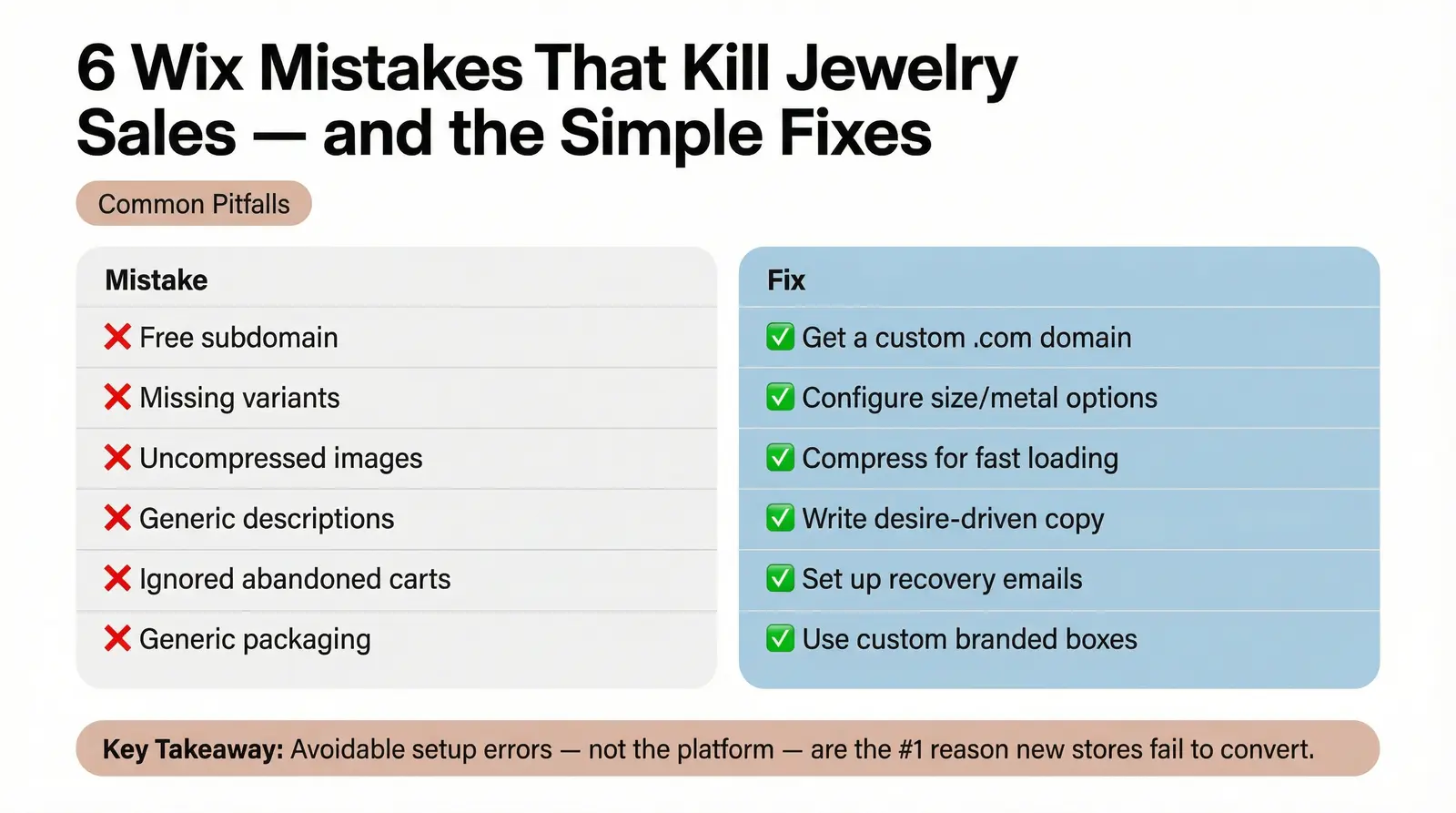
1. Is Wix good enough to sell jewelry professionally?
Yes, absolutely. Wix provides all the necessary ecommerce tools, secure payment gateways, and design flexibility required to run a professional, high-converting jewelry store. Its visual-first approach is particularly well-suited for the aesthetics of the jewelry industry.
2. How do I add product variants (like metal type or chain length) in Wix?
In your Wix dashboard, navigate to Store Products > Products. Select a product, scroll down to the "Product Options" section, and click "Add Options." You can then define variants like "Metal Type" (e.g., Gold, Silver) or "Size" and assign specific inventory or price differences to each.
3. Can I dropship or use a fulfillment partner with Wix?
Yes. Wix integrates with numerous dropshipping apps and allows for API connections or CSV exports to third-party fulfillment partners. This makes it easy to automate your supply chain, especially when using a service like Branvas for private-label jewelry.
4. How does Wix compare to Shopify for a jewelry brand just starting out?
Wix is generally easier to use and offers more creative freedom for designing a beautiful storefront without coding. Shopify is more rigid but excels in handling massive product catalogs and complex backend operations. For most new jewelry brands, Wix's design capabilities and lower learning curve make it the preferred starting point.
5. What's the best Wix plan for a jewelry store?
The Wix Core plan (starting around $29/month) is the best entry point. It includes essential ecommerce features, secure payments, and a free custom domain for the first year. As your sales volume grows, you can upgrade to the Business or Business Elite plans for advanced features like automated sales tax and priority support.
Building a successful online jewelry brand requires more than just beautiful products; it requires a storefront that builds trust, showcases your pieces flawlessly, and operates smoothly behind the scenes. Wix is a highly capable platform that empowers founders to achieve exactly that, provided it is set up correctly. By following this guide, optimizing your SEO, and avoiding common pitfalls, you are laying the groundwork for a scalable, revenue-generating business.
The technical setup is only the beginning. The true secret to scaling a jewelry empire is focusing on your brand and your customers, rather than getting bogged down in inventory management and shipping logistics. Build your jewelry empire on the platform of your choice, and let automation handle the rest.
Ready to fill your Wix store with branded, private-label jewelry — without touching inventory? Start with Branvas and launch your collection in days. For more tailored advice, explore our resources for ecommerce and boutique store owners.