


This technical guide walks jewelry sellers through a 5-stage WooCommerce integration framework covering supplier vetting, product attributes, plugin selection, inventory sync, and launch QA.
Published:
April 23, 2026
Author:
Yi Cui
Unlock the power of WordPress for your jewelry store. WooCommerce powers roughly 23% of all ecommerce websites globally and runs on over 4.4 million active stores [1]. Jewelry, meanwhile, is one of the highest-margin, most brand-sensitive product categories you can sell online. The global online jewelry market is projected to reach $85.7 billion in 2026, growing at a 13% compound annual growth rate [2]. The opportunity is real. The competition is real. And the technical setup is what separates stores that scale from stores that stall.
Whether you are an established boutique owner, an aspiring jewelry entrepreneur, or an influencer launching a product line, integrating a reliable supplier with your WooCommerce store is the critical step between a nice-looking website and a profitable business. This guide provides a step-by-step technical walkthrough for setting up a jewelry store on WooCommerce, connecting suppliers, managing inventory, configuring products, and enabling dropshipping or private-label fulfillment. It is written for smart ecommerce sellers, not developers with a decade of WooCommerce experience.
WooCommerce offers distinct advantages for jewelry sellers: full ownership of your store, unparalleled flexibility, no platform-level transaction fees, and a deep ecosystem of plugins [3]. Unlike hosted platforms that charge monthly fees and take a cut of every sale, WooCommerce lets you keep more of your high-margin jewelry profits.
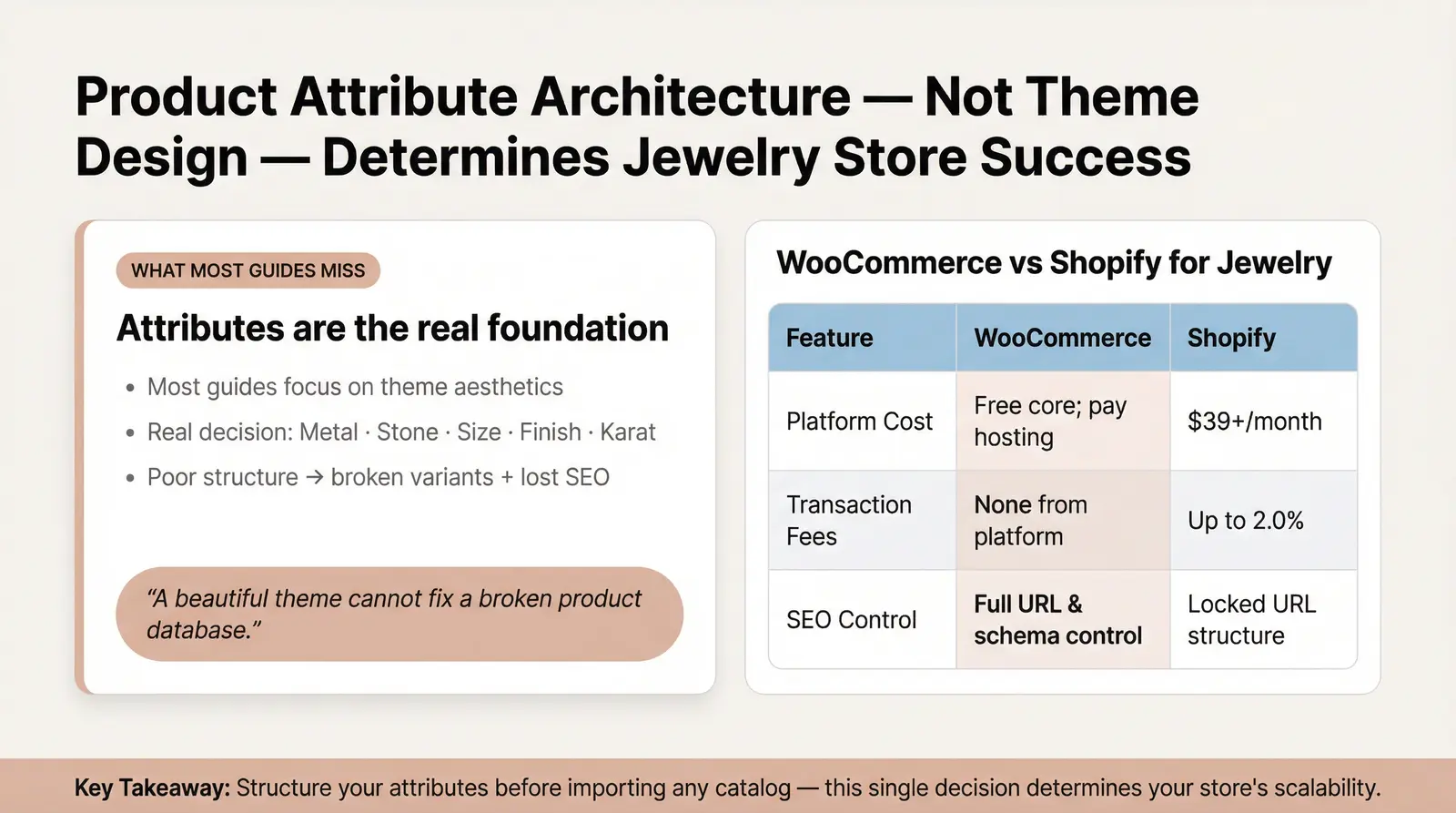
Here is the contrarian insight most guides miss. They spend pages on theme aesthetics and almost nothing on product attribute architecture. Getting your attributes right (metal type, stone, size, finish, karat) is the make-or-break technical decision for any jewelry store. Structure them poorly and you will break variant management, disrupt inventory synchronization, and damage your SEO all at once [4]. A beautiful theme cannot fix a broken product database. This is the single most important decision you will make before launch.
Here is a quick comparison of how WooCommerce stacks up against Shopify for jewelry sellers:
| Feature | WooCommerce | Shopify |
|---|---|---|
| Platform Cost | Free core plugin; pay for hosting and premium plugins. | $39+ monthly fee; additional costs for premium apps. |
| Transaction Fees | None from the platform; only payment gateway fees apply. | Up to 2.0% fee if not using Shopify Payments, plus gateway fees. |
| Customization & SEO | Complete control over URL structure, schema, and technical SEO. | Locked URL structures; easier setup but less technical flexibility. |
Before you connect a supplier or import a single product, your WooCommerce environment must be properly configured to handle a jewelry catalog.
Hosting requirements. Jewelry stores are inherently image-heavy. You need a hosting environment that can deliver high-resolution images quickly. A minimum of 2GB RAM (preferably 4GB+) and a CPU-optimized VPS or managed WordPress hosting plan is recommended [5].
SSL, CDN, and image optimization. An SSL certificate is non-negotiable for processing payments securely. You must also implement a Content Delivery Network (CDN) and image optimization. Serve your jewelry images in next-gen formats like WebP and enable lazy loading to ensure fast page speeds without sacrificing image quality [6].
WooCommerce and PHP versions. Always run the latest stable versions. WooCommerce currently recommends PHP 8.3 or greater and MySQL 8.0+ (or MariaDB 10.6+) for optimal security and performance [7].
Choosing a jewelry theme. Select a WooCommerce-compatible theme that supports essential jewelry features out of the box. Look for built-in product schema markup, robust product gallery standards, and native support for image zoom and lightbox features. These are crucial for showcasing fine jewelry details [8].
Setting up product attributes first. Before importing any supplier catalogs, define your global product attributes in WooCommerce (Products > Attributes). Create attributes for Metal, Stone, Size, Finish, and Karat. Establishing this taxonomy before you import anything ensures that products map correctly and variants generate cleanly.

At Branvas, we have seen firsthand what separates successful jewelry launches from technical disasters. We developed The Branvas Integration Framework™ as a structured, repeatable methodology for jewelry sellers setting up WooCommerce supplier integrations. It has five stages. Each one builds on the last.
The first step is evaluating a jewelry supplier's data readiness. Do they offer automated product feeds, CSV exports, or a direct API? You must demand specific data fields: SKU, title, description, metal type, stone, weight, dimensions, Minimum Order Quantity (MOQ), price tiers, inventory count, and high-resolution image URLs.
Red flags to watch for include suppliers with no standardized SKU system, inconsistent naming conventions, or an inability to provide bulk data exports. If a supplier cannot give you a clean CSV on request, their data will cause problems in every stage that follows.
With your supplier data vetted, you must map their fields to your WooCommerce attributes. Go to Products > Attributes and create global attributes using clean slugs (e.g., metal-type, ring-size). Use lowercase, hyphenated slugs consistently. Inconsistent slugs (e.g., RingSize vs. ring-size) will create duplicate taxonomy terms and break your faceted navigation.
For jewelry, you will frequently use Variable Products rather than Simple Products. A Simple Product is a single item with no options (e.g., a one-size-fits-all pendant). A Variable Product allows customers to choose between different options and is the correct product type for most jewelry SKUs. Each variation can carry its own price, stock level, SKU, and image, which is essential when a polished finish commands a different price than an oxidized one.
When you create a global attribute, WooCommerce registers it as a custom taxonomy. This means your attribute terms (e.g., "Sterling Silver", "14k Gold") become filterable, linkable, and indexable by search engines. This is a significant SEO advantage that most store owners never take advantage of.
Worked Example: Imagine a sterling silver ring offered in sizes 5 through 10, available in three finishes (polished, matte, oxidized).
This structure also makes bulk imports far cleaner. When you later import a CSV from your supplier, each row maps to a specific variant rather than creating a new top-level product. That keeps your catalog organized and your SEO consolidated under a single product URL.
Choosing the right integration plugin depends on your supplier's capabilities. Here is an honest evaluation of the top options:
| Plugin | Best For | Automation Level | Jewelry-Specific Features | Approx. Cost |
|---|---|---|---|---|
| WooCommerce Dropshipping (OPMC) | Standard dropshipping with local/global suppliers | Medium (Automated emails to suppliers) | PDF packing slips, margin calculations | $89/year |
| AliDropship | AliExpress-based sourcing | High (One-click import, auto-sync) | Built-in image editor for watermarks | $89 (One-time) |
| WP Fusion / Webhooks | API-capable private suppliers | Very High (Real-time sync) | Custom field mapping for complex variants | $247+/year |
| Product CSV Import Suite | Manual or semi-automated catalog management | Low to Medium | Handles complex variable product imports | $79/year |
| DSers | High-volume AliExpress dropshipping | High (Bulk order processing) | Variant mapping, supplier optimization | Free to $49.90/mo |
Inventory synchronization prevents you from selling out-of-stock items. Depending on your setup, this can be achieved via three primary methods [9].
Webhook-based sync is the most reliable. When a supplier's inventory changes, their system pushes an update to your WooCommerce REST API endpoint in real time. This requires your supplier to support outbound webhooks, but it eliminates the lag that comes with polling.
Scheduled CSV pulls are the most common setup for smaller suppliers. You configure a cron job or plugin to fetch an updated inventory file from the supplier's server at set intervals (e.g., every 4 hours). This is simple to implement but means your stock levels are always slightly behind.
API polling sits in the middle. Your WooCommerce store queries the supplier's API at regular intervals to check for changes. It is more accurate than CSV pulls but creates more server load than webhooks.
Order routing logic determines how a customer's order reaches the supplier after checkout. You must configure how your system handles partial fulfillment (when only some items are in stock), backorders, and out-of-stock variants. Note that if you partner with a platform like Branvas, order routing and blind fulfillment are handled automatically through our native integration. No manual forwarding or complex webhook configuration is required.
Before driving traffic to your store, run through this QA checklist:

Jewelry buyers have high purchase consideration. They will revisit your site multiple times before buying. Technical SEO ensures they find you in the first place and that your pages load fast enough to keep them.
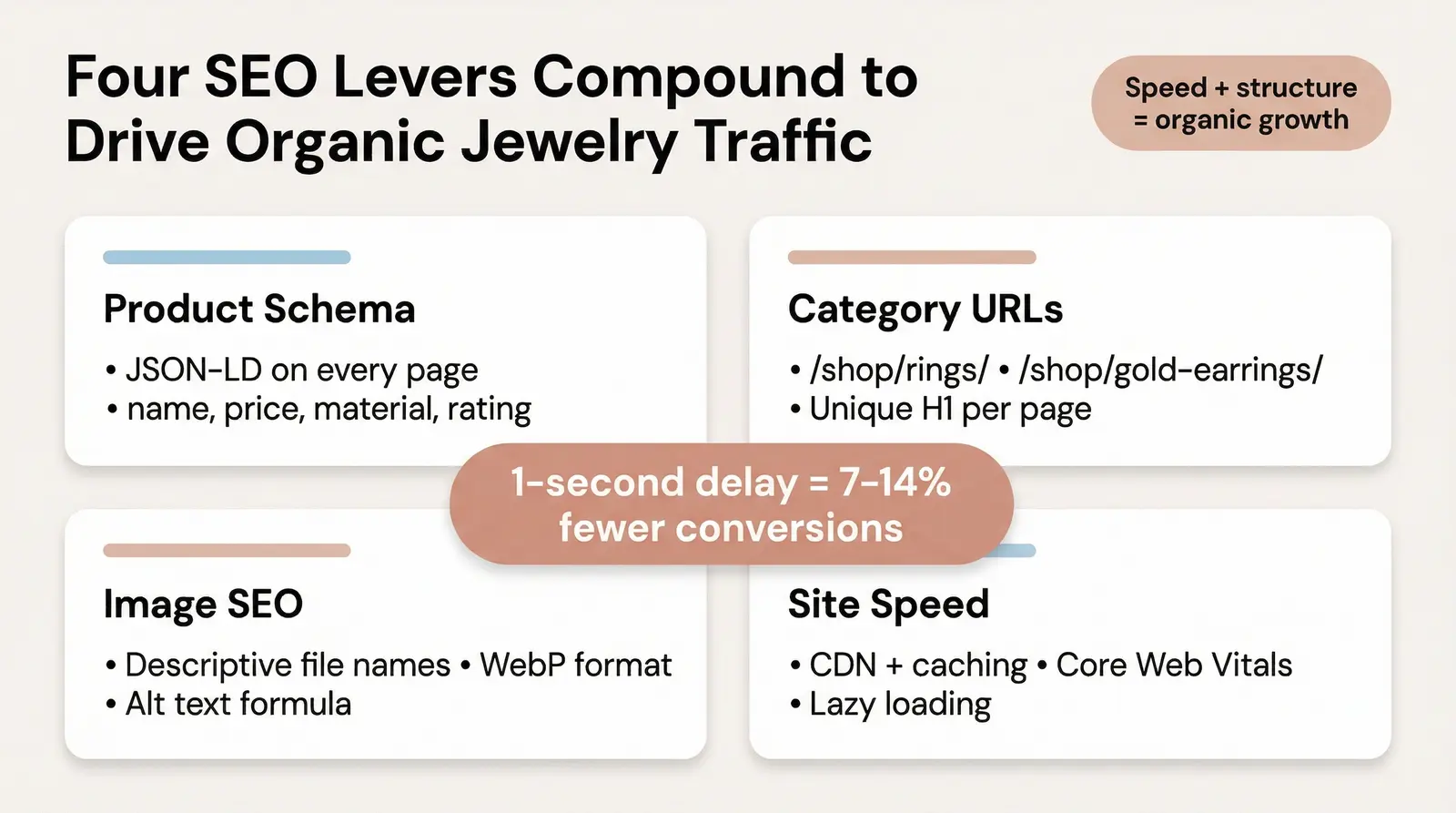
Product schema markup. Implement JSON-LD Product schema on every product page. For jewelry, the most critical fields are name, image, offers (price and availability), aggregateRating, and material [10]. This structured data enables rich snippets in Google search results, which increases click-through rates significantly. Plugins like Rank Math and Yoast SEO generate this markup automatically from your WooCommerce product data, but you should verify the output using Google's Rich Results Test tool.
Category page SEO. Structure your category pages with clear intent-driven URLs (e.g., /shop/rings/, /shop/necklaces/, /shop/gold-earrings/). Each category page needs a unique H1 tag, a descriptive meta description targeting the category keyword, and at least a short paragraph of introductory copy. Internal links from category pages to top-selling products pass authority and help Google understand your site's hierarchy.
Image SEO. Never upload images with default camera file names. Use descriptive file names and consistent alt text formulas. For example, name your file sterling-silver-hoop-earrings-14k-gold-plated.webp and write alt text like "14k gold plated sterling silver hoop earrings on model." This format includes the material, product type, and key modifier, which is exactly what jewelry shoppers search for.
Site speed. Page speed matters disproportionately for jewelry stores. Research consistently shows that a one-second delay in load time reduces conversions by 7 to 14%. Jewelry buyers are making high-consideration purchases and will not wait for slow pages. Use a caching plugin, serve images via CDN, optimize your database regularly, and test your Core Web Vitals score before launch.
If you need a head start on product data, the Branvas product catalog provides ready-to-use, SEO-friendly product data that imports cleanly into WooCommerce.
There is a real difference between generic dropshipping (reselling commodity products from AliExpress) and private-label fulfillment (putting your brand on the product and packaging).
Private-label is the smarter long-term play. It builds brand equity, encourages repeat purchases, differentiates you from competitors, and allows for significantly higher profit margins. When you sell generic items, you compete on price. When you sell a brand, you compete on value. That is a fundamentally different business.
Branvas enables private-label jewelry fulfillment that connects directly to WooCommerce stores. We provide custom branded packaging, blind shipping, and high-quality products with zero inventory risk. You can explore our solutions for ecommerce sellers and run the numbers with our profit calculator before committing to anything. In our experience at Branvas, sellers who start with dropshipping and upgrade to private-label within 6 months see significantly higher customer retention and average order value. The packaging alone changes how customers perceive the brand.
Ready to launch your private-label jewelry brand on WooCommerce? Explore how Branvas works →

We often see new jewelry sellers make the same technical errors. These are not obvious mistakes. They are the kind that only show up after you have already imported 400 products and wonder why nothing is working. Most of them are preventable if you follow the framework above in order. But for completeness, here are the six we see most often:

Yes. You can use dropshipping or private-label fulfillment models to route orders directly to a supplier who ships the product to your customer on your behalf. You never touch the stock. Platforms like Branvas handle sourcing, packaging, and blind shipping automatically, so your WooCommerce store captures the sale and the supplier handles the rest.
It depends on your supplier. AliDropship is excellent for AliExpress-based sourcing and offers a one-time fee with lifetime updates. WooCommerce Dropshipping by OPMC is a solid choice for standard supplier relationships and supports automated email notifications to fulfillment partners. For private-label brands with API access, a direct webhook integration or native app offers the highest level of automation and real-time inventory sync.
You must first create Global Attributes under Products > Attributes. Create separate attributes for Ring Size, Metal Type, Stone, and Finish. Then create a Variable Product, add the relevant attributes, check the "Used for variations" box for each, and use the Variations tab to generate all combinations. Each variant can have its own SKU, price, and stock level.
WooCommerce offers lower long-term costs, zero platform transaction fees, and superior SEO control, making it the stronger choice for sellers who want full ownership of their store. Shopify is easier to set up initially and includes more built-in features, but comes with higher monthly costs and less flexibility over URL structure and technical SEO. For jewelry sellers who care about margins and organic traffic, WooCommerce is typically the better platform.
You can connect a private-label supplier using their native WooCommerce integration (if they offer one), a custom API webhook that routes orders automatically, or a CSV inventory sync plugin for semi-automated catalog management. The cleanest setup is a supplier with a native WooCommerce app that handles product sync, order routing, and fulfillment tracking in one place. Check the supplier's pricing and integration documentation before committing.