


Building a store is easy; building trust is hard. Use our 5-layer “AI Build Stack” to launch a legitimate, high-converting Shopify brand in under 5 days using AI tools.
Published:
January 29, 2026
Author:
Yi Cui
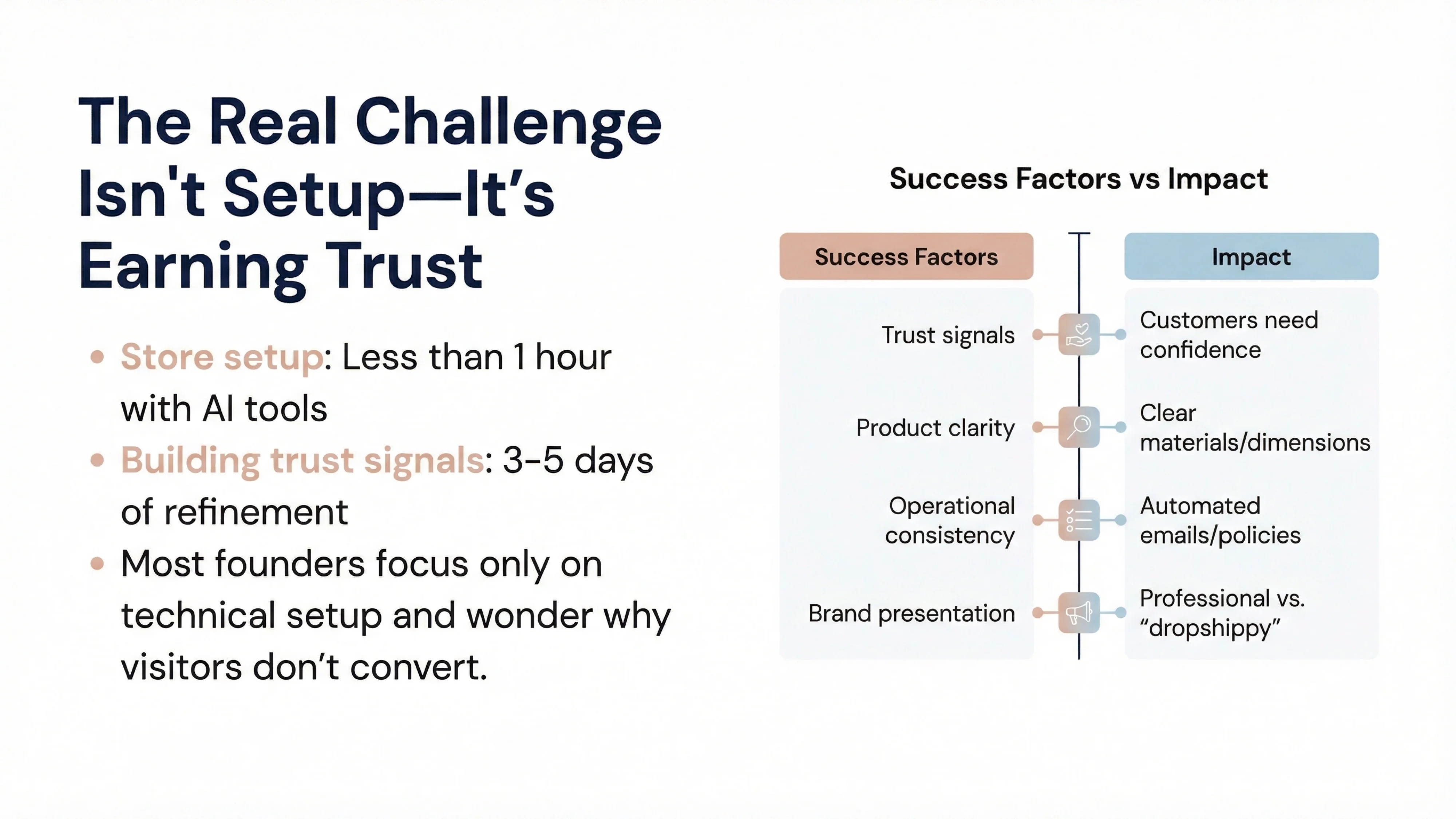
Setting up a Shopify store in 2026 takes less time than ever before. With drag-and-drop builders, AI-powered content generation, and one-click integrations, you can technically launch a store in under an hour. The real challenge isn't getting your store online—it's getting customers to trust you enough to buy.
In our experience at Branvas, we've seen hundreds of founders launch stores that look technically complete but fail to convert visitors into customers. The difference between a store that launches and a store that sells comes down to trust signals, product presentation clarity, and operational consistency. These elements take more time to build than the store itself, but they're what separate legitimate brands from sites that visitors immediately dismiss as "dropshippy" or scammy.
This guide will walk you through how to build a Shopify store step by step in 2026, with a focus on using AI to accelerate decision-making and execution while maintaining the human touch that builds credibility. You'll learn not just how to set up Shopify, but how to create a store that customers feel confident buying from—whether you're building a dropshipping operation, a branded retail store, or something in between.
What you'll accomplish: In 60 to 120 minutes of focused work, plus a few days of refinement, you'll have a functional Shopify store with the foundational trust elements that drive conversion. More importantly, you'll understand the strategic framework that guides every decision from theme selection to product page structure.
Most Shopify tutorials stop at theme installation and product uploads. That's like building a house and stopping after framing the walls. What we've learned after helping founders launch real businesses is that successful stores are built in five distinct layers, and most people only focus on the first two.
Layer 1: Offer Layer (What you sell, who it's for, differentiation)
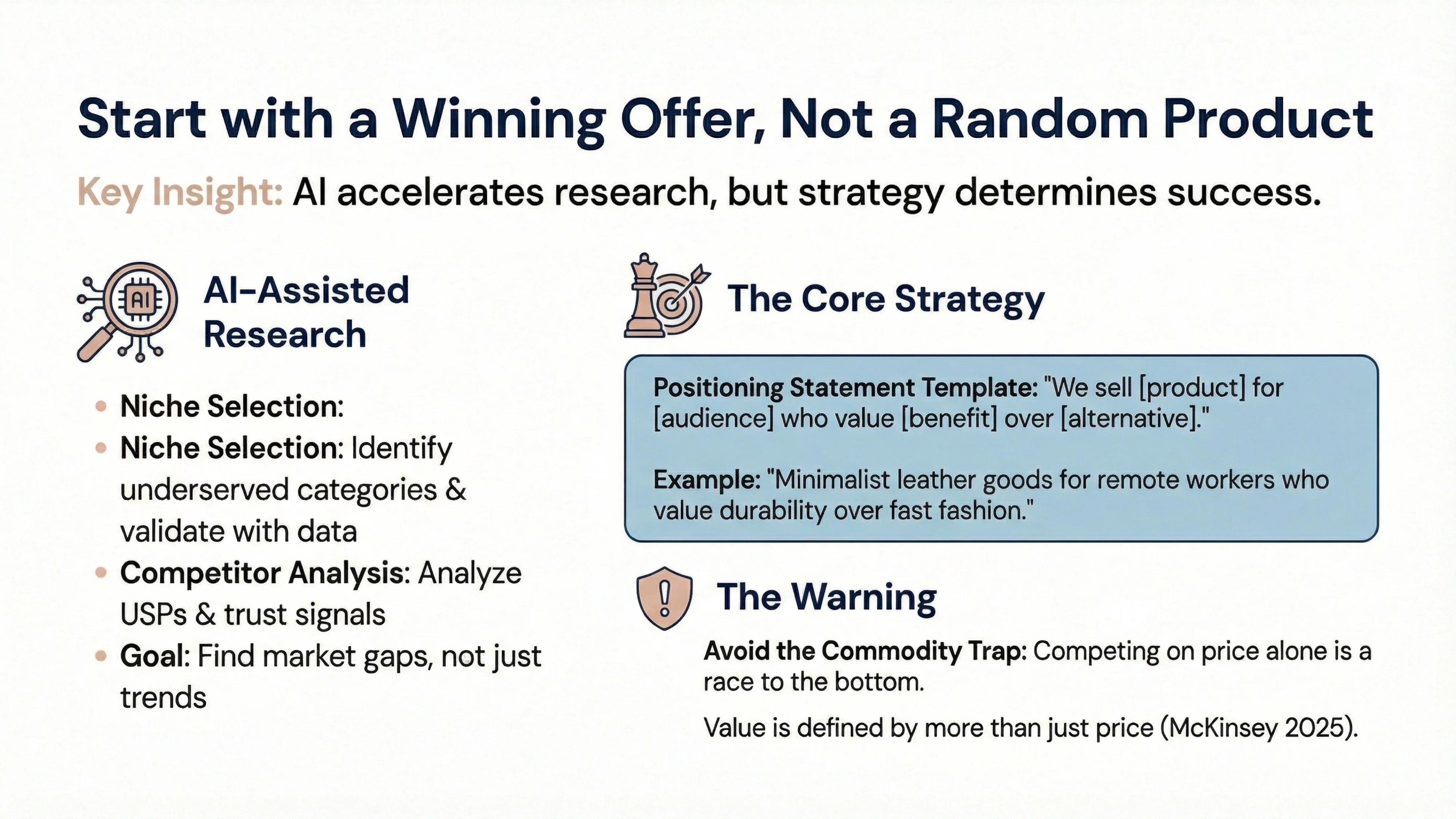
This is your strategic foundation. Before you touch Shopify, you need clarity on your offer: What are you selling? Who is it for? Why should they buy from you instead of Amazon or a competitor? AI can help you research competitors, analyze market positioning, and draft positioning statements, but the strategic decisions are yours. A weak offer will fail no matter how beautiful your store looks.
Layer 2: Store Layer (Theme, structure, pages)
This is where most people start and stop. You pick a theme, set up navigation, create a homepage, and add product pages. It's the visible infrastructure of your store. AI can generate homepage copy, suggest navigation structures, and even recommend theme layouts based on your niche. This layer is important, but it's not sufficient.
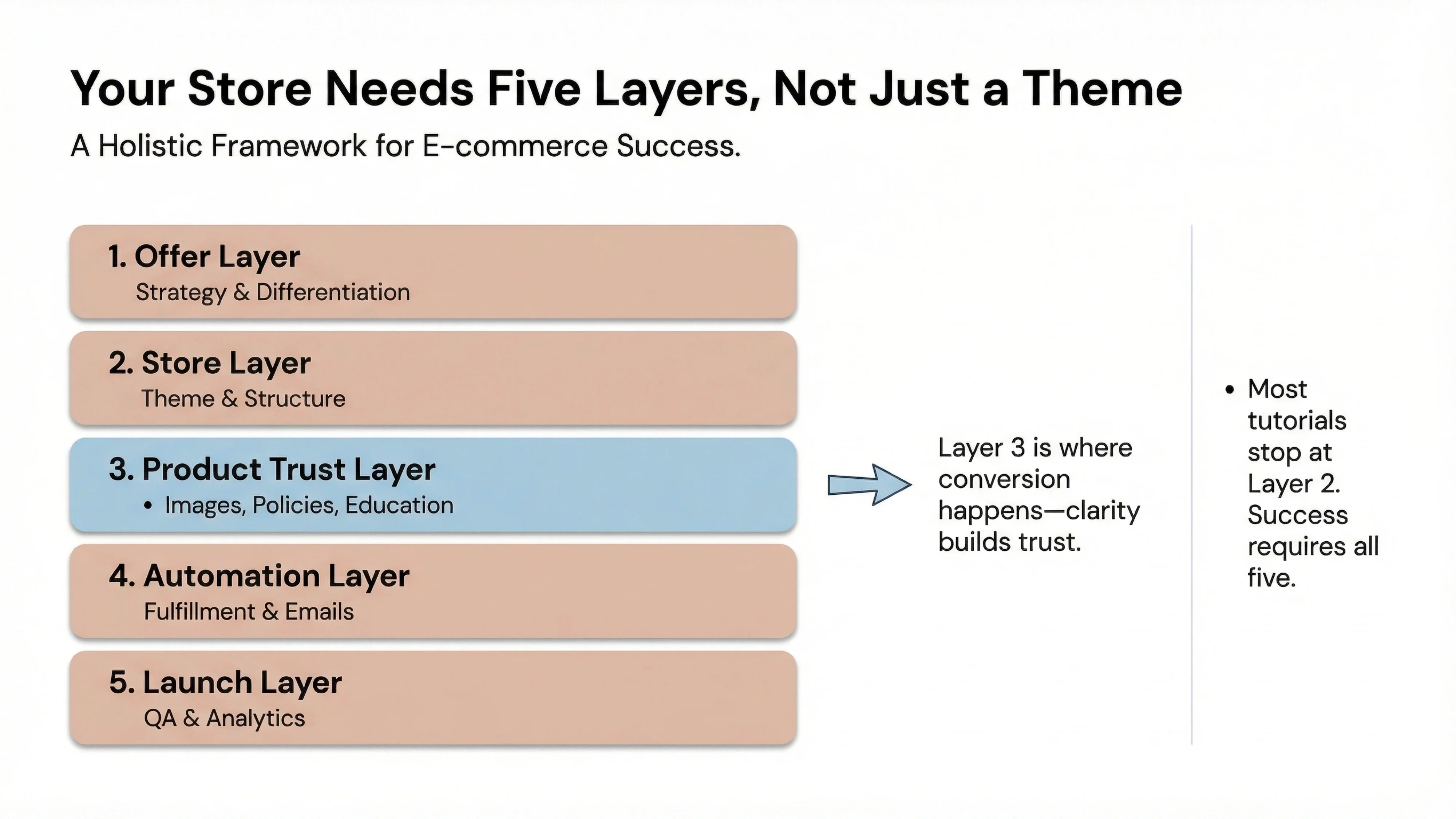
Layer 3: Product Trust Layer (Images, materials education, policies, FAQs)
This is where conversion happens or dies. Product pages need more than descriptions—they need trust content blocks, shipping clarity, materials education (especially for jewelry, apparel, and home goods), and social proof. In our experience at Branvas, this is the layer that founders rush through, and it costs them dearly. A customer who doesn't understand what "gold vermeil" means versus "gold plated" will not buy your jewelry, no matter how good your Instagram ads are.
Layer 4: Automation Layer (Fulfillment, email/SMS basics, tracking)
Before you spend a dollar on ads, you need operational automation in place: abandoned cart emails, welcome sequences, order tracking, and fulfillment workflows. These systems ensure that when traffic arrives, your store behaves like a real business, not a side project. AI tools can write your email sequences and set up basic automations in minutes.
Layer 5: Launch Layer (QA, analytics, initial traffic plan)
This is your pre-flight checklist. Mobile QA, payment testing, policy clarity, analytics installation, and a plan for your first 100 visitors. Most guides ignore this entirely, which is why so many stores launch with broken checkout flows or missing tracking pixels.
Why this framework matters: Most Shopify guides stop at Layer 2. They teach you how to build a store, not how to build a business. The stores that succeed in 2026 are the ones that treat Layers 3, 4, and 5 with the same rigor as Layers 1 and 2. AI can accelerate execution across all five layers, but only if you understand what each layer is designed to accomplish.
Before you build anything, you need to know what you're selling and why anyone should care. This is the Offer Layer of the framework, and it's where AI can provide the most leverage for research and positioning.
Niche selection with AI
Use AI tools like ChatGPT, Claude, or Gemini to research niche opportunities. Ask questions like: "What are underserved product categories in [your interest area]?" or "What are common complaints about existing products in [category]?" AI can scan trends, suggest niches, and help you identify gaps in the market. However, validate AI suggestions with real research: check Google Trends, browse Reddit communities, and look at competitor reviews on Amazon [1].
Competitor scan
AI can help you analyze competitor positioning quickly. Feed competitor website URLs or product descriptions into AI tools and ask: "What is this brand's unique selling proposition?" or "What trust signals is this site using?" This gives you a baseline for what's working in your niche and where you can differentiate.
Positioning statement
Draft a one-sentence positioning statement that answers: Who is this for? What problem does it solve? Why is it different? Example: "We sell minimalist leather goods for remote workers who value durability and timeless design over fast fashion trends." AI can help you refine this statement, but the core insight must come from your understanding of the market.
What to avoid: The commodity trap
Don't build a store around products that are identical to what's available everywhere else unless you have a differentiation strategy (better service, faster shipping, educational content, brand story). Competing on price alone in 2026 is a race to the bottom. According to McKinsey's 2025 State of the Consumer report, consumers are making unexpected trade-offs—trading down in some categories while splurging in others—which means value is defined by more than just price [5].
Once you've defined your offer, it's time to set up the technical foundation of your Shopify store. This is straightforward, but there are settings that matter more than others.
Domain, payments, and shipping zones
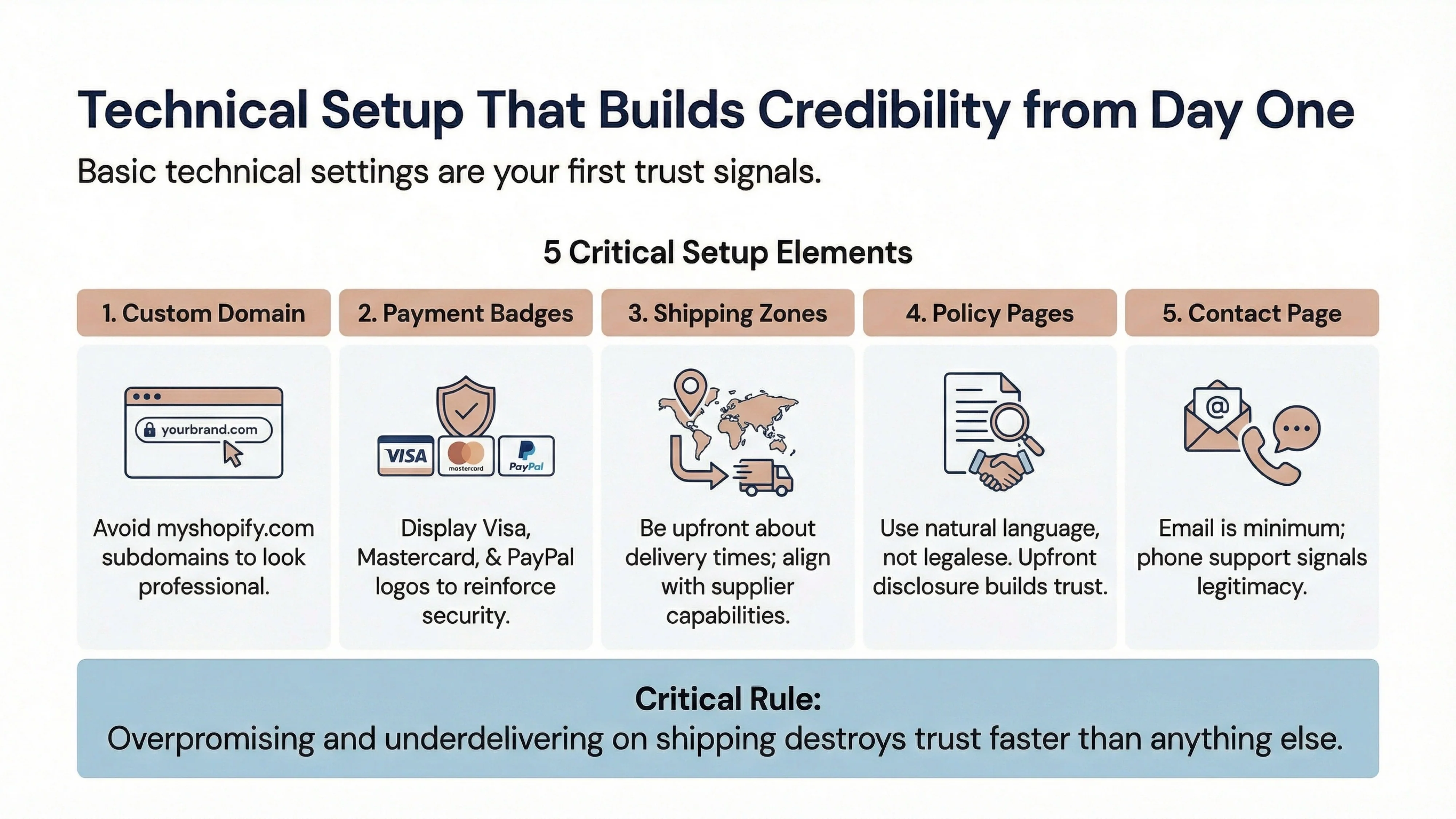
Purchase a custom domain through Shopify or connect one you already own. A custom domain (yourstore.com) is a basic trust signal—stores using myshopify.com subdomains look unfinished [4]. Set up Shopify Payments or a trusted payment gateway like PayPal or Stripe. Display payment provider badges (Visa, Mastercard, PayPal) on your checkout page to reinforce security [2].
Configure shipping zones based on where you'll actually ship. If you're dropshipping, align your zones with your supplier's capabilities. Be upfront about shipping times—overpromising and underdelivering destroys trust faster than anything else [3].
Tax settings
Shopify can automatically calculate taxes for most regions, but verify that your settings are correct for your primary markets. This is especially important if you're selling in the EU (VAT) or California (CCPA compliance).
Policy pages and contact page basics
Create clear, readable policy pages: Privacy Policy, Terms of Service, Refund Policy, and Shipping Policy. Use natural language, not legalese. According to Nielsen Norman Group research, upfront disclosure of policies is one of four core credibility factors that have remained stable since 1999 [4]. Customers need to know what happens if something goes wrong before they'll trust you with their money.
Add a contact page with an email address at minimum. If you can offer a phone number, even better—phone support is a strong trust signal, especially for higher-ticket items [3].
Choosing a theme is important, but how you structure your Shopify site determines whether visitors can find what they need and feel confident buying. This is where you move from setup to strategy.
Homepage sections that convert
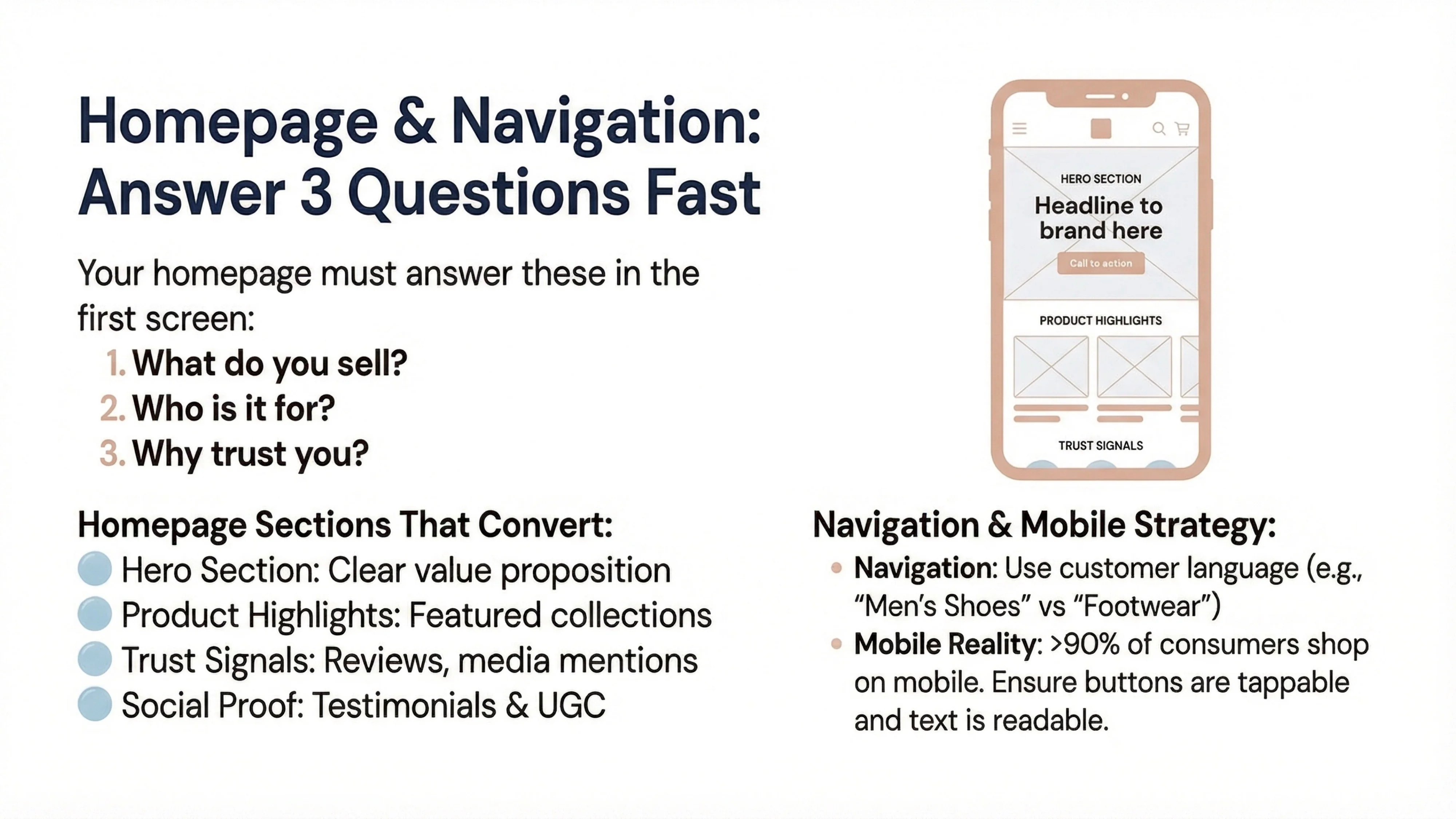
Your homepage should answer three questions in the first screen (above the fold): What do you sell? Who is it for? Why should I trust you? Use Shopify's drag-and-drop editor to create sections that include:
AI can generate homepage copy quickly. Prompt it with: "Write a homepage hero section for a [your niche] store targeting [your audience] that emphasizes [your differentiation]." Refine the output to match your brand voice.
Navigation principles
Keep navigation simple and predictable. Use clear category names that match how customers think, not clever internal jargon [4]. For example, "Men's Shoes" is better than "Footwear for Him." Include utility navigation (Contact, FAQ, Shipping, Returns) in your header or footer so customers can find operational information quickly.
Collection strategy
Organize products into collections based on how customers shop, not how you organize inventory. For jewelry, this might be "Everyday Necklaces," "Statement Earrings," "Gifts Under $50." For apparel, it might be "Work from Home Essentials" or "Travel-Friendly Basics." AI can suggest collection names based on your product list and target audience.
Mobile-first constraints
Over 90% of consumers in major markets now shop on mobile devices regularly [5]. Preview your store on mobile before you launch. Ensure that buttons are large enough to tap, text is readable without zooming, and checkout flows work smoothly on small screens. Mobile experience is non-negotiable in 2026.
Product pages are where conversion happens. A generic product page with a single image and a two-sentence description will not convert in 2026, no matter how much traffic you drive. Customers need clarity, context, and confidence before they buy.
Product titles and descriptions
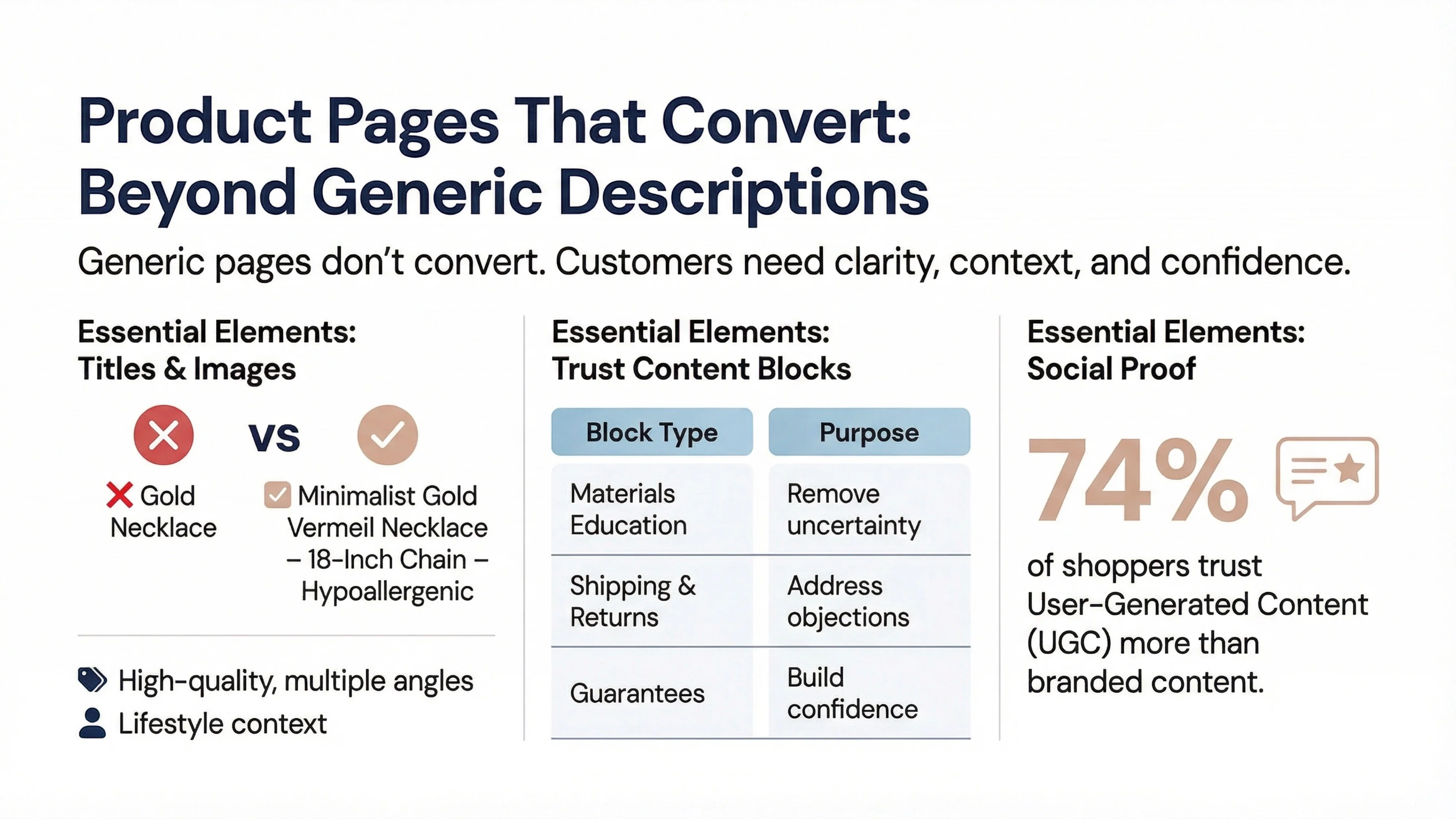
Write descriptive, specific product titles that include key attributes: "Minimalist Gold Vermeil Necklace – 18-Inch Chain – Hypoallergenic" is better than "Gold Necklace." AI can generate product descriptions quickly, but you must edit them to ensure accuracy and brand voice. Avoid generic AI-generated fluff like "elevate your style" or "perfect for any occasion." Be specific about materials, dimensions, use cases, and care instructions.
Product images
Use high-quality images that show the product from multiple angles, in use, and at scale (next to common objects or on a model). If you're dropshipping, request additional images from your supplier or use AI tools to enhance or generate lifestyle images. According to research on eCommerce trust signals, visuals build instant relationships with customers and help them understand and trust your product [2].
Trust content blocks
Add content blocks to product pages that address common objections and build confidence:
Materials education example: Gold Vermeil vs. Gold Plated
Many jewelry sellers lose sales because customers don't understand materials. Here's a simple explainer block you can adapt:
What is Gold Vermeil?
Gold vermeil (pronounced "ver-may") is a thick layer of gold (at least 2.5 microns) bonded to sterling silver. It's more durable and longer-lasting than gold plating, which uses a thin layer of gold over base metal. Vermeil won't tarnish or flake with normal wear, making it ideal for everyday jewelry. All our pieces are 18K gold vermeil, hypoallergenic, and safe for sensitive skin.
This type of content builds trust by educating customers. It signals that you know your products and care about transparency. In our experience at Branvas, adding materials education blocks to product pages increases conversion rates because it removes uncertainty.
User-generated content (UGC)
If you have customer photos or videos, feature them prominently on product pages. UGC is trusted more than branded content by 74% of shoppers [2]. If you're just launching, consider seeding your store with content from beta testers or offering discounts in exchange for reviews and photos.
Dropshipping has a reputation problem in 2026. Customers have been burned by long shipping times, poor quality, and unresponsive sellers. If you're building a dropshipping store, you need to work twice as hard to signal legitimacy and brand professionalism.
Supplier selection criteria
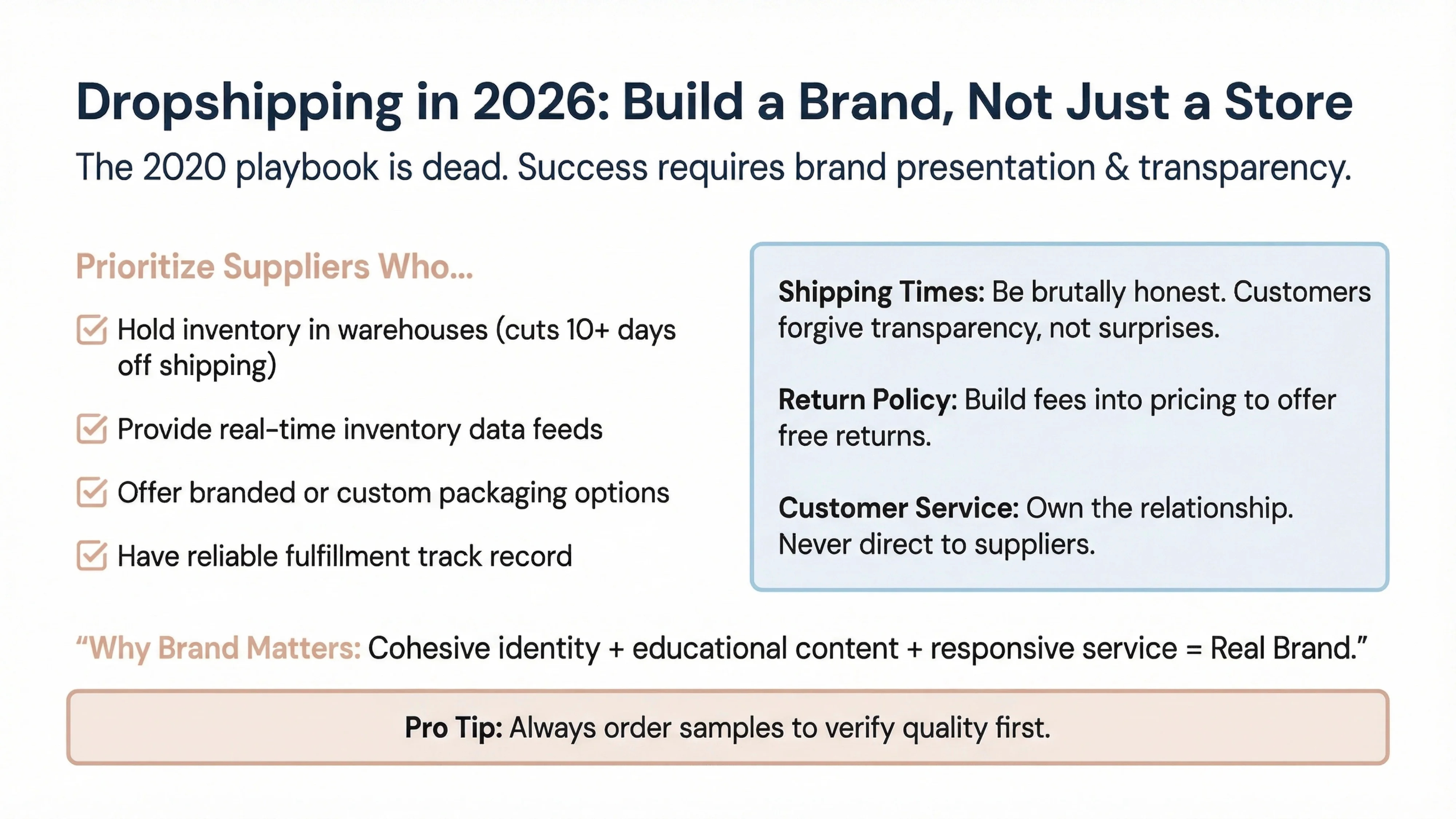
Not all dropshipping suppliers are created equal. Prioritize suppliers who:
Use Shopify apps like Branvas, DropCommerce, or AI Dropship to connect with vetted suppliers [3]. Test suppliers by ordering samples before you list their products.
Fulfillment expectations and transparency
Be brutally honest about shipping times. If your supplier ships from overseas and delivery takes 2-3 weeks, say so upfront. Customers will forgive long shipping times if you're transparent; they won't forgive surprises. According to Shopify's dropshipping best practices, under no circumstances should you direct customers to contact your supplier—own the customer relationship entirely [3].
Returns and delivery transparency
Write a clear, customer-friendly return policy. If your supplier charges restocking fees, build that into your pricing so you can offer free returns to customers. Transparency about what happens if something goes wrong is one of the core credibility factors identified by Nielsen Norman Group [4].
Why brand presentation matters more than "winning products"
The dropshipping playbook of 2020—find a "winning product," run Facebook ads, scale—no longer works. Customers are savvier, ad costs are higher, and trust is harder to earn. The stores that succeed with dropshipping in 2026 are the ones that build real brands: cohesive visual identity, educational content, responsive customer service, and consistent messaging.
Branvas positioning for dropshippers
At Branvas, we help dropshipping stores present products like established brands. Our platform supports brand-ready visuals, product presentation tools, and educational content blocks that make your store look legitimate from day one. The goal isn't to hide that you're dropshipping—it's to build a brand that customers trust regardless of your fulfillment model.
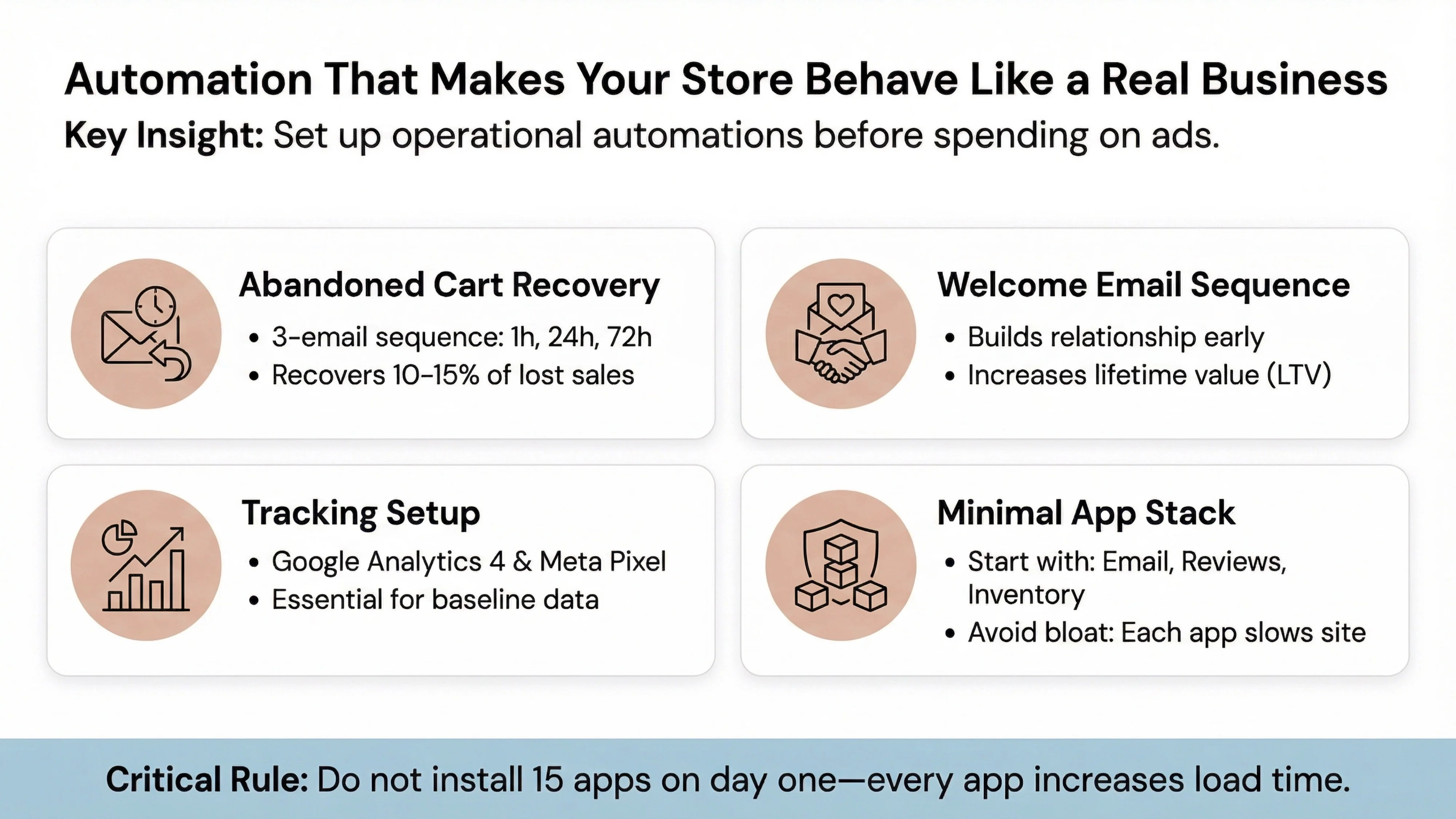
Before you drive traffic to your store, set up the operational automations that make your store behave like a real business. These systems run in the background and recover revenue, build relationships, and provide peace of mind.
Abandoned cart email
Shopify has built-in abandoned cart recovery. Enable it and customize the email sequence. A simple three-email sequence (sent at 1 hour, 24 hours, and 72 hours after abandonment) can recover 10-15% of lost sales. Use AI to write the email copy, but personalize it to your brand voice.
Welcome email sequence
When someone subscribes to your email list or makes their first purchase, send a welcome sequence that introduces your brand, sets expectations, and offers value (a discount, a guide, or educational content). This builds the relationship early and increases lifetime value.
Basic tracking (GA4 and Meta Pixel)
Install Google Analytics 4 and Meta Pixel (if you plan to run Facebook/Instagram ads) before launch. You need baseline data to understand where traffic comes from, what pages convert, and where visitors drop off. Shopify makes this easy with one-click integrations.
Minimal app stack (avoid bloat)
This is critical: Do not install 15 apps on day one. Every app you add increases page load time, introduces potential conflicts, and clutters your admin dashboard. Start with the essentials:
Add apps only when you have a specific problem to solve. More on this in the next section.
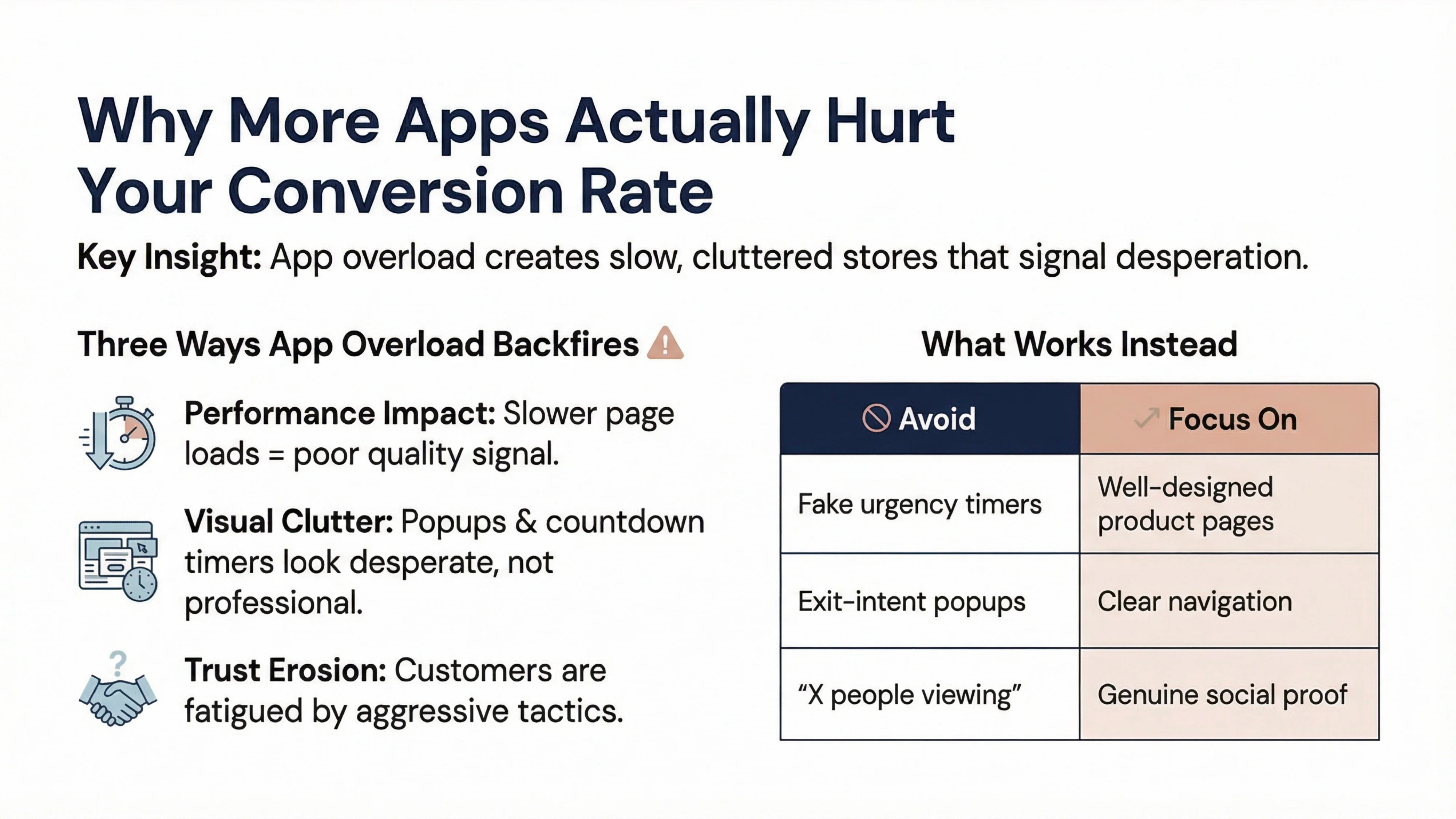
Here's something most Shopify tutorials won't tell you: Installing too many apps can actively hurt your conversion rate. We see this pattern repeatedly at Branvas—founders install every app that promises to boost sales (countdown timers, exit-intent popups, "X people are viewing this" notifications, live chat widgets, spin-to-win wheels) and wonder why their bounce rate is 80%.
Why app overload backfires
First, performance. Every app adds JavaScript to your site, which slows down page load times. According to Nielsen Norman Group, fast loading times are a key performance indicator of trustworthy sites [4]. A slow site signals poor quality and lack of attention to detail.
Second, clutter. When visitors land on your site and are immediately hit with a popup asking for their email, a chat widget in the corner, a countdown timer, and a "someone in Texas just bought this" notification, it doesn't look professional—it looks desperate. These tactics might work on high-traffic, established brands, but on a new store, they scream "I'm trying too hard to manipulate you."
Third, trust. Customers in 2026 are fatigued by aggressive conversion tactics. McKinsey's research shows that digital channels win users but not their trust [5]. The more your store feels like a pushy salesperson, the less customers trust you.
What works instead: Minimal and consistent
In our experience at Branvas, the stores that convert best are the ones that feel calm, clear, and confident. They don't need popups because their product pages are so well-designed that visitors want to buy. They don't need fake urgency timers because their brand story and social proof create real urgency.
Focus on the fundamentals: fast load times, clear navigation, high-quality images, transparent policies, and genuine social proof. If you must use apps, choose one or two that solve real problems (like email capture or reviews) and integrate them thoughtfully. Your store should feel like a trusted boutique, not a carnival midway.
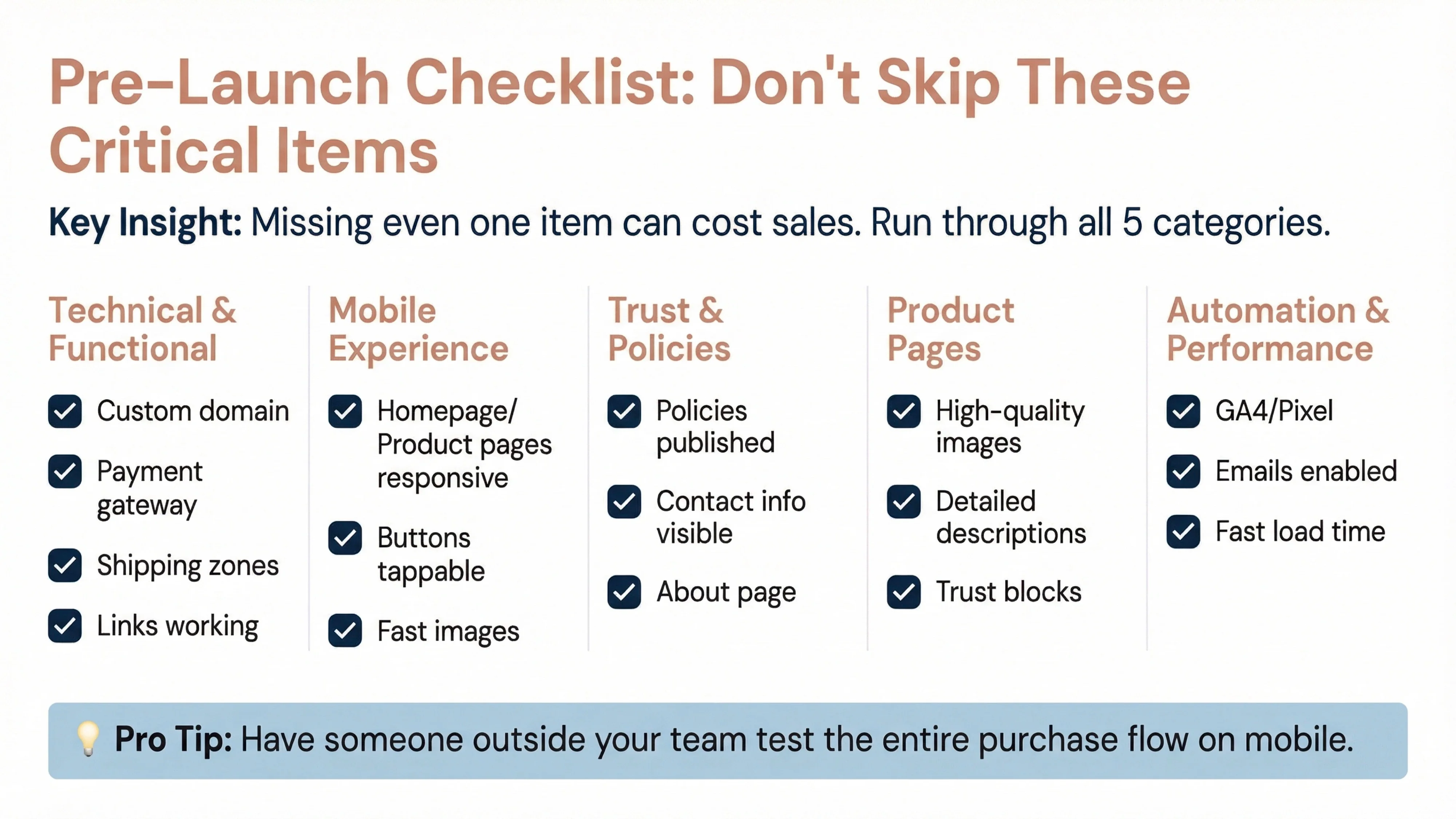
Before you make your store live, run through this checklist. Missing even one item can cost you sales or damage your reputation.
✅ Custom domain connected and working
✅ SSL certificate active (HTTPS padlock visible)
✅ Payment gateway tested with real transaction
✅ Shipping zones configured correctly
✅ Tax settings verified for primary markets
✅ All links working (no 404 errors)
✅ Contact email monitored and responsive
✅ Homepage loads correctly on mobile
✅ Product pages readable without zooming
✅ Checkout flow works on mobile
✅ Buttons large enough to tap easily
✅ Images load quickly on mobile data
✅ Privacy Policy published and linked in footer
✅ Terms of Service published and linked in footer
✅ Refund/Return Policy clear and customer-friendly
✅ Shipping Policy states delivery times honestly
✅ Contact information visible (email at minimum)
✅ About page tells your brand story
✅ High-quality images (multiple angles, in use)
✅ Detailed descriptions (materials, dimensions, care)
✅ Trust content blocks (shipping, returns, guarantees)
✅ Materials education (if relevant)
✅ Reviews or social proof (even if seeded)
✅ Google Analytics 4 installed and tracking
✅ Meta Pixel installed (if running ads)
✅ Abandoned cart email enabled
✅ Welcome email sequence created
✅ Order confirmation email customized
✅ Page load time under 3 seconds on desktop
✅ Page load time under 5 seconds on mobile
✅ No unnecessary apps slowing site down
✅ Images optimized for web (compressed)
✅ Test purchase completed successfully
✅ Order confirmation email received
✅ Payment processed correctly
✅ Inventory updated after test order
✅ Refund process tested (if applicable)
Pro tip: Have someone outside your team (a friend, family member, or beta tester) go through the entire purchase flow on mobile and give you honest feedback. Fresh eyes catch issues you've become blind to.
Feel free to try out Branva's AI store builder, Sitemuse, to build a high-conversion Shopify store in 10 minutes.
AI can accelerate nearly every step of building a Shopify store in 2026. Use AI tools like ChatGPT, Claude, or Gemini to research niches, analyze competitors, generate product descriptions, write homepage copy, create email sequences, and suggest site structure. However, AI should be used as a co-pilot, not an autopilot. The strategic decisions—what you sell, who you target, how you differentiate—must come from you. AI handles execution speed; you handle strategy and quality control.
The technical setup of a Shopify website can be completed in 60-120 minutes if you're focused and have your content ready. However, building a store that actually converts takes longer. Plan for 3-5 days to complete all five layers of the AI Shopify Build Stack: Offer, Store, Product Trust, Automation, and Launch. Most of that time should be spent on Layer 3 (product pages, trust content, policies) and Layer 5 (QA and testing). Rushing through these layers is the most common mistake we see at Branvas.
Building a legitimate-looking dropshipping store in 2026 requires focusing on brand presentation, not just product listings. Order samples from your suppliers to verify quality and take original photos. Write detailed, accurate product descriptions that include materials, dimensions, and care instructions. Be transparent about shipping times—if delivery takes 2-3 weeks, say so upfront. Add trust signals like customer reviews, clear return policies, and responsive customer service. Use tools like Branvas to create brand-ready visuals and educational content blocks that make your store feel like an established brand, not a generic dropshipper.
The best Shopify theme for beginners in 2026 is Dawn, Shopify's free default theme. It's fast, mobile-optimized, and flexible enough for most use cases. Dawn is built on Shopify's latest theme architecture (Online Store 2.0), which means it's future-proof and easy to customize without code. More important than theme choice is how you use the theme: clear navigation, high-quality images, trust signals, and mobile optimization matter more than fancy animations or complex layouts. Avoid the temptation to buy premium themes until you've validated your offer and proven that your store converts.
The most important pages for a Shopify store are: Homepage (first impression and navigation hub), Product Pages (where conversion happens), About Page (brand story and trust-building), Contact Page (accessibility and support), Shipping Policy (delivery expectations), and Return/Refund Policy (risk reduction). These six pages form the trust foundation of your store. According to Nielsen Norman Group, upfront disclosure and comprehensive content are core credibility factors [4]. Customers need to know who you are, what you sell, how long it takes to arrive, and what happens if something goes wrong before they'll trust you with their money.
[1] Shopify. (2025, November 5). How To Start an Online Store in 2026 (Step-By-Step Guide). Shopify Blog. https://www.shopify.com/blog/start-online-store
[2] Ojeda Melchor, L. (2025, September 23). 5 Trust Signals That Instantly Boost Conversion Rates. Crazy Egg. https://www.crazyegg.com/blog/trust-signals/
[3] Shopify. (2025, May 22). 15 Dropshipping Tips for a Successful Business (2026). Shopify Canada Blog. https://www.shopify.com/ca/blog/dropshipping-tips
[4] Harley, A. (2016, May 8). Trustworthiness in Web Design: 4 Credibility Factors. Nielsen Norman Group. https://www.nngroup.com/articles/trustworthy-design/
[5] McKinsey & Company. (2025, June 9). State of the Consumer 2025: When disruption becomes permanent. McKinsey Consumer Packaged Goods Insights. https://www.mckinsey.com/industries/consumer-packaged-goods/our-insights/state-of-consumer